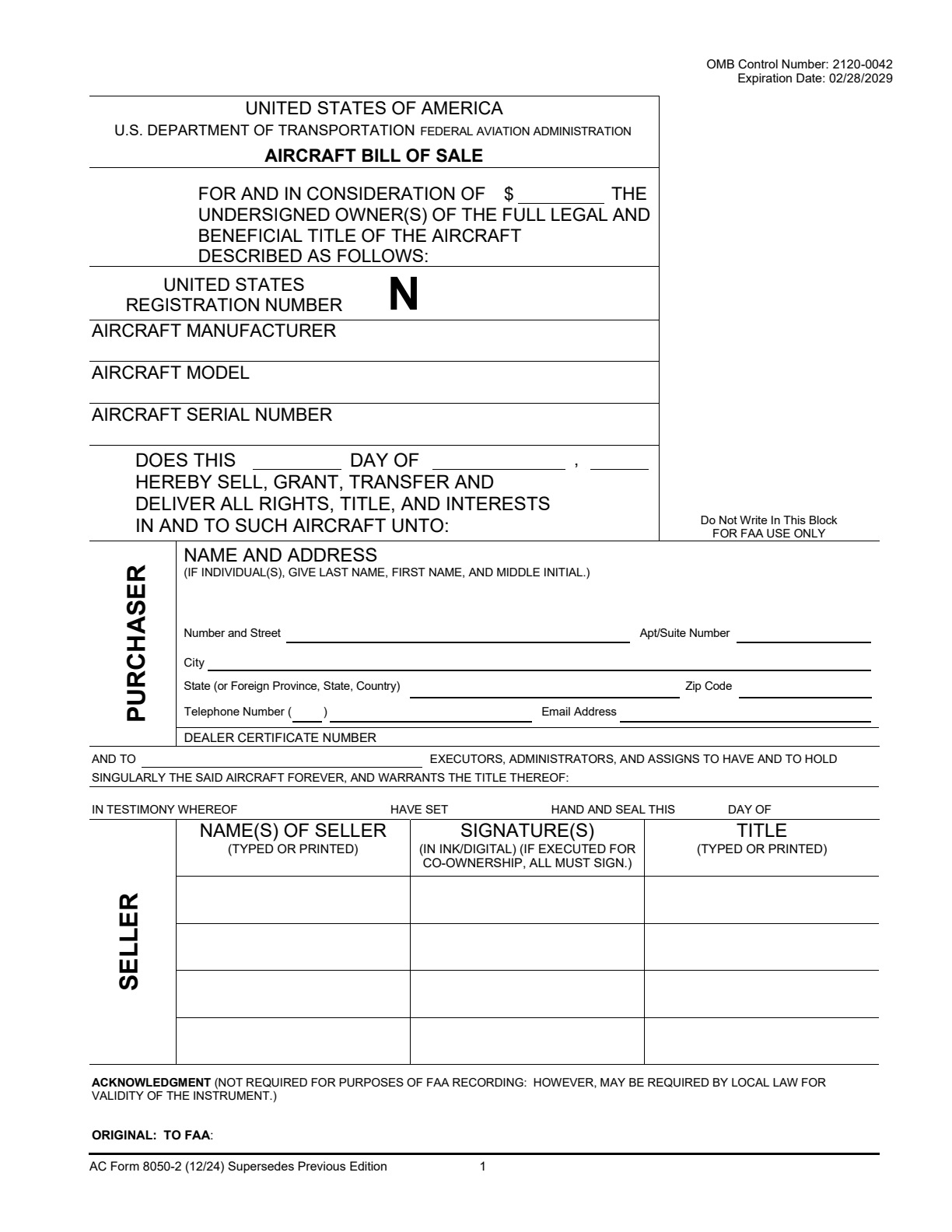
FAA Aircraft Bill of Sale
This preview shows the official FAA AC 8050-2 form. Open its page on FAA.gov to get the current fillable PDF and preparation instructions.
Preview the FAA form and see how to fill it in.
Use the FAA Aircraft Bill of Sale, AC 8050-2, to record an aircraft transfer. The buyer’s registration application is a separate step.
Follow the fill-in guide below, get the current form from FAA.gov, and use our preparation checklist to check the details before signing.
Document the sale and agreed terms. Give both seller and buyer a signed copy.
See what the form looks like, then follow the fill-in guide. Get the current PDF from the FAA before you complete it.
This preview shows the official FAA AC 8050-2 form. Open its page on FAA.gov to get the current fillable PDF and preparation instructions.
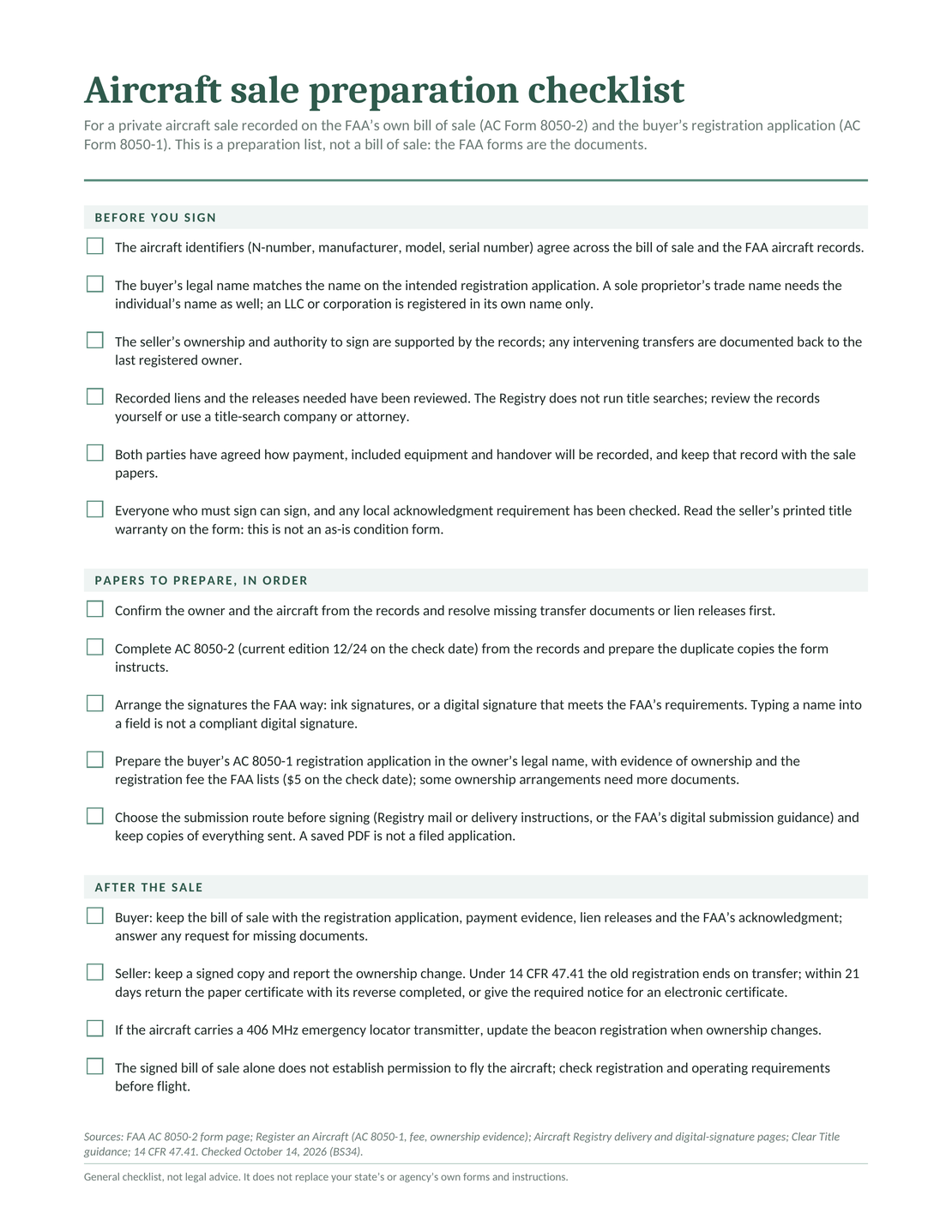
Keep track of the records, signatures and filing steps. This Docelf checklist helps you prepare; it is not a bill of sale.
You can also read the preparation checklist online or check the official AC 8050-2 form page.
The bill of sale is an official FAA form. The Docelf checklist and guidance are general information, not legal advice. This page covers an ordinary sale of an already U.S.-registered aircraft; other transactions may need additional documents. See our Terms and Conditions.
Records the aircraft transfer and provides evidence of ownership for the buyer’s registration application. Complete the official form using the aircraft and ownership records.
The buyer applies to register the aircraft in the owner’s legal name. The application needs supporting ownership documents and the fee the FAA lists.
The FAA’s registration instructions explain the application, ownership evidence and eligibility requirements. Imports, exports, trusts, estates and first registrations can need additional paperwork.
The N-number is the U.S. registration number shown on the aircraft’s registration certificate and exterior markings. For a fixed-wing aircraft, the FAA’s marking rule places these marks on the vertical tail or sides of the fuselage, subject to its exceptions. Compare the number with the current aircraft records.
The aircraft’s identification plate lists the builder, model and builder’s serial number. For many aircraft, the plate is on the fuselage exterior just behind the rearmost entrance door or near the tail. FAA rules provide different locations for older aircraft and certain aircraft types, so use the aircraft’s documentation or ask a qualified aircraft mechanic if you cannot locate it.
Enter the aircraft serial number in the bill of sale’s serial-number field. Keep it separate from the N-number and from the serial numbers on the engine or propeller. Resolve any difference between the plate and ownership records before completing the sale paperwork.
Use the aircraft records and agreed sale details. Follow the preparation instructions included with AC 8050-2; the markers below identify the main fields.
Take care with business names. A sole proprietor’s trade name needs the individual owner’s name as well. An LLC or corporation uses its own legal name; adding an individual as a buyer can indicate co-ownership. See the FAA form instructions.
Confirm that the seller owns the aircraft or has authority to sign for the owner. If the seller is not the last registered owner, gather the transfer documents that connect the registered owner to the buyer. Resolve gaps before filing.
Review the aircraft records and any liens or releases. The FAA’s clear-title guidance explains that the Registry does not perform title searches. You can review the records yourself or use an aircraft title-search company or attorney.
Get AC 8050-2 from FAA.gov and use the checklist to gather the details and supporting paperwork before signing.
Choose the filing route before signing so your documents and signatures meet its requirements. Keep a copy of everything you submit.
A typed name alone is not enough to establish an acceptable digital signature. Follow the FAA’s digital signature requirements or the signature process in the FAA service you use.
A signed bill of sale is not, by itself, permission to fly. Confirm the aircraft’s registration and operating requirements before flight.
The buyer should keep the bill of sale, registration application, proof of payment, lien releases and FAA correspondence together. The seller should keep a signed copy and complete the ownership-change reporting steps.
Under 14 CFR 47.41, the old registration ends when ownership transfers. Within 21 days, the certificate holder must return the paper certificate with its reverse completed, or give the required notice for an electronic certificate.
If the aircraft has a 406 MHz emergency locator transmitter, update its beacon registration when ownership changes. The FAA registration page links to the beacon registration service.
Use these FAA and federal sources when preparing the sale and registration documents:
No. AC 8050-2 is the bill of sale. The buyer’s registration application is AC 8050-1 and requires supporting ownership documents and the applicable fee.
The current AC 8050-2 form has seller signature blocks. Follow the form’s instructions for every seller or authorized representative who must sign. The buyer’s registration application has its own signature requirements.
The FAA form says acknowledgment is not required for FAA recording. Local requirements affecting the document’s validity may still apply, so check those before signing.
Start with the official FAA form and instructions linked here. If your transaction needs a different ownership document, confirm what the Aircraft Registry will accept for that transaction.
Yes. The linked official PDF has fields you can complete before printing or applying an acceptable digital signature. Keep the instructions with it and submit the required paperwork through an accepted FAA process.
Use the FAA form and preparation checklist to organize the sale.
Create free business documents like invoices, estimates, quotes and receipts from these blank, printable and downloadable templates

Create and send unlimited documents. Every feature is included.
Create and send unlimited documents.
Every feature is included.
No credit card required.
After 14 days, continue for $12.99/month only if you choose to upgrade.