Document the sale and agreed terms. Give both seller and buyer a signed copy.
Download a Free Mobile Home Bill of Sale
Choose a Word or Google Docs template to edit, a fillable PDF to type into, or a blank PDF to print. For Google Docs, sign in and choose Make a copy to save your own version.
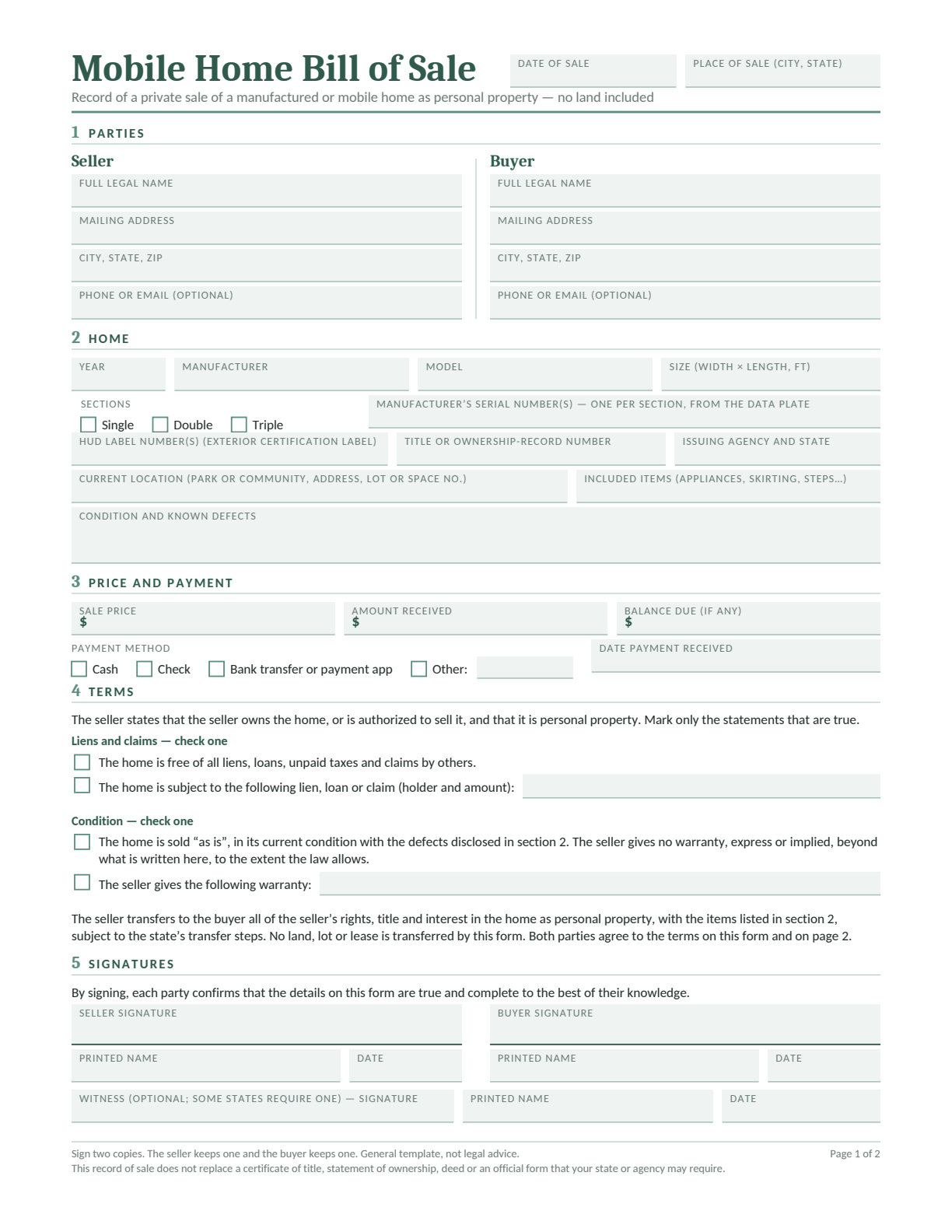
Mobile Home Bill of Sale
For a manufactured or mobile home sold as personal property, with no land included.
Record the home’s identifying numbers, location, included items, condition and payment. The second page has room for handover arrangements or extra terms. Confirm the home’s legal status before using this form.
This template records a personal-property sale. It does not transfer land or a lot lease, or replace required title, ownership or deed paperwork. It is general information, not legal advice. See our Terms and Conditions.
What Is a Mobile Home Bill of Sale?
A mobile home bill of sale records the seller, buyer, home and sale terms. It describes what the buyer is getting, how much is being paid and when the home will be handed over.
Use this template only for a home being sold as personal property. The home’s status and your state’s process determine which ownership documents must accompany the sale.
Check Whether the Home Is Personal Property
Start with the home’s current ownership record and the agency that handles it. Selling a home without land does not, by itself, mean the home is legally personal property.
Home Sold as Personal Property
Confirm the title or ownership record, the named owner and the transfer process. This template can record the sale details alongside the required agency forms.
Home Recorded as Real Property
If the home is part of real property, or land is included in the sale, ask a title company or attorney which deed and closing documents are needed. This template does not handle that transfer.
Year, manufacturer, model, width and length, and number of sections.
Serial numbers
The manufacturer’s serial number for each section. Compare the numbers on the home with the ownership record.
HUD labels
The exterior certification label number for each section, where present. Keep these separate from the manufacturer’s serial numbers.
Ownership record
Title or ownership-record number, issuing agency and state.
Location
Park or community name, street address and lot or space number.
Included and excluded items
Appliances, skirting, steps and other items in the sale. Name anything the seller will keep.
Condition
Known defects, inspection findings and any agreed repairs.
Keep the manufacturer’s serial number and HUD label numbers separate. The identification guide below explains where to look for each one.
Where to Find the Serial Number and HUD Labels
Start With the Data Plate Inside the Home
Look in a kitchen cabinet, a bedroom closet, or on or near the main electrical panel. The data plate is a paper label that lists the manufacturer, model and serial number, along with the home’s HUD label numbers. HUD’s identification guide explains what each label contains.
Copy the manufacturer’s serial number and each HUD label number into their separate fields. Compare them with the ownership record. If labels are missing, follow HUD’s verification guidance or ask the state’s ownership-record office for help identifying the home.
How to Fill In Your Mobile Home Bill of Sale
Use the ownership record, the numbers on the home and your agreed sale terms. The five numbered sections show where to enter the details.
12345
Add the seller and buyer: Use full legal names and addresses. Enter the date and place of sale at the top.
Describe the home: Copy its year, manufacturer, model, size and section details. Enter serial and HUD label numbers separately, then add the location, included items and known defects.
Write the payment details: Separate the agreed price from the money received. Record the payment method and date, and any balance still due.
Review terms and handover: Check the lien and condition statements. Use page two for keys, possession, moving dates, repairs or a balance due date. Arrange any lot rental separately.
Review and sign: Follow the official signing instructions and keep a complete signed copy for each party. Complete the required ownership transfer forms as well.
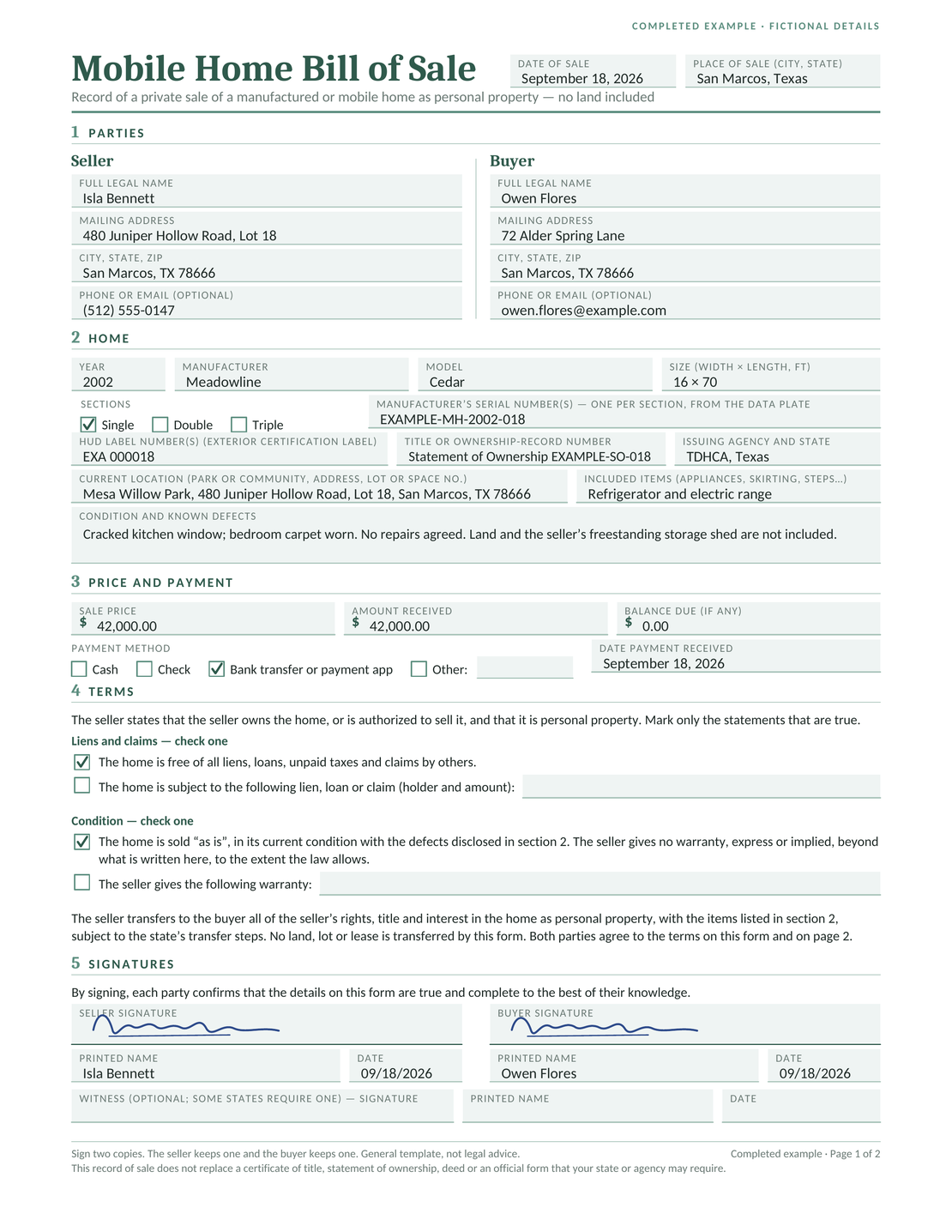
See a Completed Mobile Home Bill of Sale
In this fictional example, Isla Bennett sells a 2002 Meadowline Cedar single-section home to Owen Flores in San Marcos, Texas, on September 18, 2026. The sale covers the home as personal property.
Detail
Fictional Example
Home
16 × 70 feet; manufacturer’s serial EXAMPLE-MH-2002-018; HUD label EXA000018.
Ownership record
Texas Statement of Ownership EXAMPLE-SO-018, issued by TDHCA.
Location
Mesa Willow Park, 480 Juniper Hollow Road, Lot 18, San Marcos, Texas.
Included and excluded
Refrigerator and electric range included. Land and the freestanding storage shed excluded.
Condition
Cracked kitchen window and worn bedroom carpet; no repairs agreed.
Payment
$42,000 sale price; $42,000 received by bank transfer on September 18, 2026; $0 balance.
Terms and handover
Lien-free and as-is statements selected. Keys are handed over on the sale date; the home stays under the buyer’s own park rental agreement.
If the home will stay in a park, confirm the buyer’s rental agreement and any approval needed from the park or landowner. The bill of sale does not transfer the seller’s lease or promise that the buyer can keep the home on the same lot.
If the home will move, agree on the collection date, moving costs and responsibility for permits and installation. Put the sale arrangements on page two and keep the separate park or moving paperwork with them.
Compare the numbers on each section of the home with the bill of sale and ownership record.
Confirm the seller’s ownership or authority to sell. Resolve recorded liens and any tax or fee clearance needed for the transfer.
Inspect the home and write down known defects. Check that the included items and any repair promises match the agreement.
Confirm payment, keys, possession and any park or moving arrangements.
Check which official documents need a witness or notary before anyone signs.
Complete the Ownership Transfer
Keep the signed bill of sale with proof of payment, ownership papers, lien releases and any park agreement. Follow the filing deadline and responsibilities assigned by the state; signing this template is only one part of the process.
In Texas, TDHCA says ownership does not pass until a completed Statement of Ownership application is filed. Its current filing instructions require submission within 60 days and explain the seller’s responsibility and possible late fee for a residential sale. Confirm who will prepare and submit the complete application; a private agreement does not remove an official duty.
No. The bill of sale records the agreed sale details. A title, Statement of Ownership or other official record is part of the state’s ownership process. Confirm the home’s status and complete the required transfer documents.
Check the instructions for the bill of sale and each official ownership form. Some documents may require notarization even when others do not. Arrange this before signing.
Contact the agency holding the ownership record and ask which replacement or transfer process applies. Resolve missing papers, ownership questions and liens before relying on a bill of sale alone.
No. Record the manufacturer’s serial number and HUD certification label number separately. A home with more than one section can have more than one of each. Compare them with the ownership record.
No. It is for the home as personal property, with no land included. Land transfers and park rental rights need separate documents and the applicable approval or closing process.
The template includes a condition statement for an as-is sale. Record known defects and any repair or warranty promises accurately. An as-is term does not replace the ownership transfer steps or every duty imposed by law.
After 14 days, continue for
$12.99/month
only if you choose to upgrade.
We use cookies to provide you with the best possible experience. Cookies also help us analyze user behaviour so we can continue to improve our website. View our cookie policy.