Free Letter of Introduction Template
Create a professional letter in minutes
Introduce your business, a new account manager, or two contacts with a letter of introduction. Give the reader a clear reason to connect and an easy way to reply.
Email, print, or download your letter as a PDF.
14-day free trial. No credit card required.
Business Introduction Letter Example
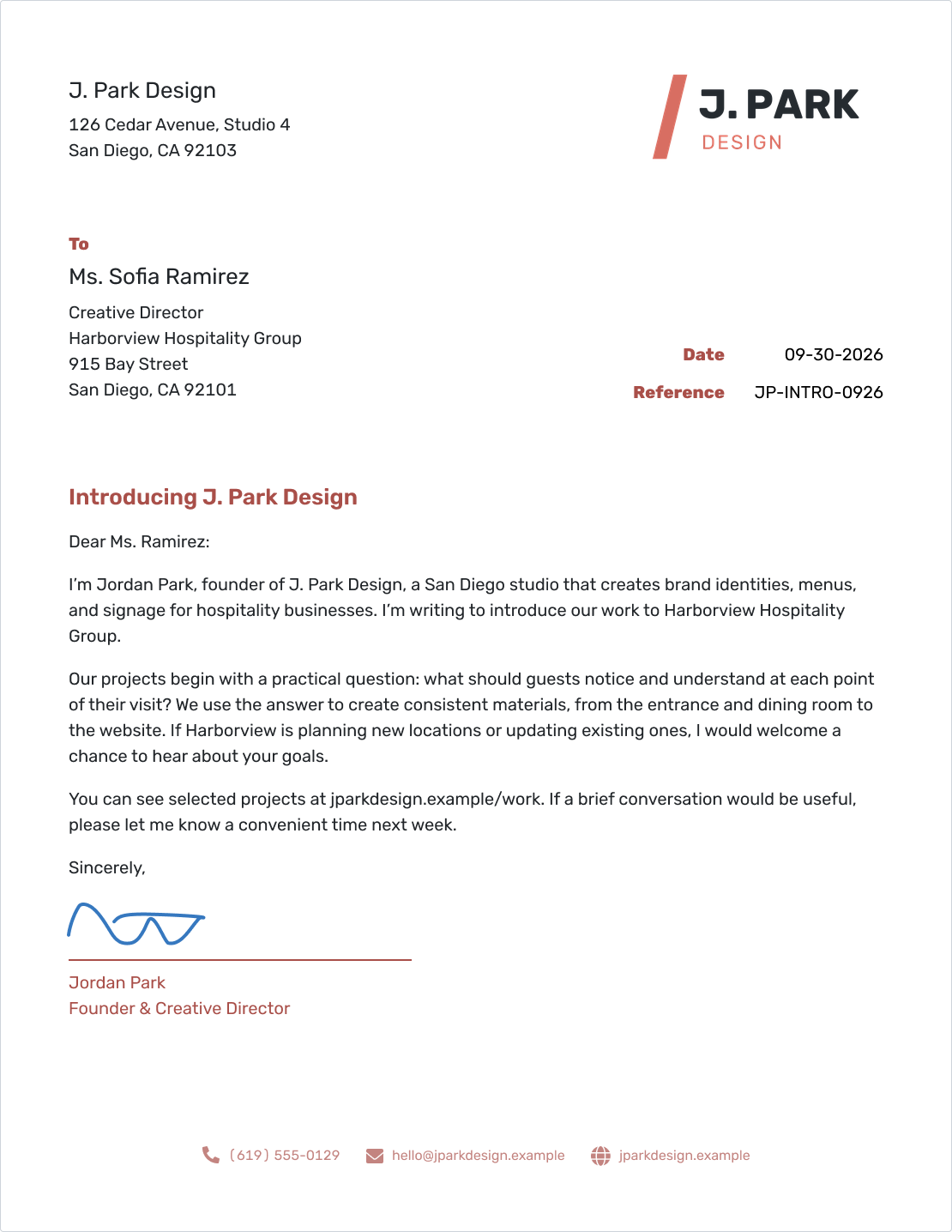
J. Park Design introduces its hospitality branding work and asks for a short conversation. Below, you can adapt the business introduction wording or use the separate letters for a new account manager and a two-contact introduction.
What Is a Letter of Introduction?
A letter of introduction presents your business or introduces one person to another. It explains who is being introduced, why the connection could be useful, and how the reader can respond.
For a prospective customer, explain why your work might be useful to their business. For an existing customer, introduce the new person they will be working with. If you only need to ask an existing contact a quick question, a short email is usually enough.
The business letter template gives you the general layout. The wording here focuses on making the connection clear.
Business Introduction Letter Template
Use this version to introduce your business to a prospective customer. Replace every [placeholder] and make the reason for writing specific to the recipient. The design-studio preview above shows how a short introduction can connect your work to the reader's plans.
Letter to a Business Prospect
[Your business name]
[Street address]
[City, State ZIP]
[Phone] | [Email] | [Website]
[Month Day, Year]
Reference: [Optional reference]
[Recipient name]
[Recipient role]
[Recipient business]
[Street address]
[City, State ZIP]
Introducing [Your business name]
Dear [Recipient name]:
I'm [Your name], [Your role] at [Your business name]. We help [Type of customer] with [Specific service or product]. I'm writing because [Relevant reason for contacting this business].
Our work includes [One or two relevant examples]. For [Recipient business], we could help with [Specific need or opportunity]. You can see examples at [Portfolio or product page].
Could we arrange [Short call or meeting] during [Proposed time period]? Please reply by [Requested response date] with a convenient time, or contact me at [Email] or [Phone].
Thank you for your time. I would welcome the chance to hear about your plans.
Sincerely,
[Signature]
[Your name]
[Your role]
[Your business name]
Keep the requested response date reasonable. If there is no time-sensitive reason to reply, remove it and simply invite the reader to suggest a convenient time. Remove the optional reference line when it adds nothing.
What to Include in Your Introduction
The reader should understand the connection without having to look you up first. Keep the letter focused on these details:
- Who you are: Your name, role, and business, or the names of the people you are introducing.
- Why this reader: A relevant need, shared contact, existing account, or genuine point of connection.
- What makes it useful: A specific service, example of work, or reason the two people might want to talk.
- One next step: A short conversation, a reply, or a clear route to the new account manager.
- How to respond: Accurate contact details and a response date when there is a reason for one.
One relevant example of your work usually says more than a string of claims about being the best. If you mention a brochure or another enclosure, include it with the letter.
How to Write a Letter of Introduction in Docelf
Follow the six numbered parts to add your details, write the introduction, and prepare the letter to share.
- Your Business: Add your business name, address, and contact details.
- Your Logo: Add your logo if you use one on your letters.
- Recipient: Add the reader's name, role, business, and address.
- Date and Reference: Set the date. Add an account or project reference if useful.
- Your Introduction: Greet the reader, explain the connection, and ask for one next step.
- Closing and Signature: Add your closing and name. Review the letter, then email it, print it, or download a PDF.
Before You Send Your Introduction
Read the letter from the recipient's point of view. They should quickly see why you are contacting them and what you are asking for.
- Names, roles, business details, and any handover date are correct.
- The opening gives a specific reason for the connection.
- Claims about your work and any shared contact are accurate.
- The request is easy to answer, and your contact details are correct.
- All [placeholders] are replaced, and any mentioned enclosure is included.
After You Send Your Introduction
- For a letter emailed from Docelf, check the document history to see when it is delivered and opened.
- If it has not been delivered, check the recipient's email address before sending it again.
- If you requested a reply, follow up after the response date with a brief reminder of the proposed next step.
An opened letter does not tell you whether the reader wants to meet. In your follow-up, refer to the original introduction and ask whether the conversation would be useful. For a handover, make sure the customer knows who to contact even if no reply is needed.
Give Your Introduction a Clear Layout
Use the wording that fits your connection. Docelf gives your letter a ready-made layout. Add your details, review it, then email it or save a PDF.
Introduce a New Account Manager
Send this version when a customer's main contact is changing. Give the new person's name and start date, and explain who to contact before and after that date.
New Account Manager Letter
[Your business name]
[Street address]
[City, State ZIP]
[Phone] | [Email]
[Month Day, Year]
Reference: [Customer account or project]
[Customer name]
[Customer business]
[Street address]
[City, State ZIP]
Introducing Your New Account Manager, [New manager name]
Dear [Customer name]:
I'm writing to introduce [New manager name], who will be your account manager at [Your business name] from [Handover date]. Please contact [New manager name] for [Relevant services or account questions].
[New manager name] has the details of [Current project or account priorities]. [Accurate statement about any arrangements that remain unchanged]. Until [Handover date], please continue to contact [Current contact name] at [Current contact details].
From [Handover date], you can reach [New manager name] at [New manager email] or [New manager phone]. Expect a call or email from [New manager name] by [Date] to discuss [Next account priority].
Thank you for working with us. We look forward to continuing to support [Customer business].
Sincerely,
[Signature]
[Sender name]
[Sender role]
[Your business name]
Remove the reference line if it is not useful. Confirm the promised contact date with the new manager before sending.
Introduce Two Business Contacts
Check that both people welcome the introduction before sharing their details. Explain why they might want to talk, then let them choose the next step.
Two-Contact Introduction Letter
[Your name]
[Your business and role]
[Street address]
[City, State ZIP]
[Your email] | [Your phone]
[Month Day, Year]
[First contact name]
[First contact business]
[Street address]
[City, State ZIP]
Introducing [Second contact name] of [Second contact business]
Dear [First contact name]:
I'd like to introduce you to [Second contact name], [Role] at [Second contact business]. [Second contact name] works on [Relevant area], which connects with your interest in [Specific topic].
I know [Second contact name] through [Accurate description of your connection]. I thought a conversation could be useful because [Specific reason the two contacts might benefit from connecting].
I've copied [Second contact name] on this letter. You can reach [Second contact name] at [Agreed email or phone]. If you would like to connect, please suggest a convenient time for a short conversation.
Thank you both. I'll leave you to decide the next step.
Best regards,
[Signature]
[Your name]
[Your role]
cc: [Second contact name, role, business]
Keep the “I've copied” sentence and cc line only if you are sending a copy to the second contact. Otherwise, remove them and share only the contact details you have permission to pass on.
Keep the Format Simple
For US business letters, use US Letter paper, readable type, and a written-out date such as September 30, 2026. Keep the body left-aligned with clear space between paragraphs. Use a suitable greeting and closing, and leave room for a signature above your typed name.
Docelf uses a slightly modified block format. The date and reference sit to the right, while the recipient details and letter text start on the left. Use the letters above as a starting point for your wording.
A short subject can help the reader recognize the introduction. A reference is optional; use it for a customer account or another matter the reader already knows. See US business letter formatting for spacing and layout guidance.
Common Introduction Letter Mistakes
A useful introduction feels written for the person receiving it. Before adding more detail, check whether it helps them decide how to respond.
- A generic opening: Replace “we offer many solutions” with the service or connection that matters to this reader.
- Too much background: Keep a long company history or full product list in a separate resource.
- Too many requests: Ask for one manageable next step instead of a meeting, an order, and a referral at once.
- An unclear handover: Give a date and direct contact details for a new account manager.
- An overstated connection: Name a shared contact only with permission and describe the relationship accurately.
If you are writing about a problem with a supplier, use a complaint letter that explains the issue and requested resolution. If you have moved on to proposed terms, a letter of intent fits that stage better.
Letter Wording and File Resources
Use the copy icon above your chosen letter to copy the wording, then replace the placeholders. To create a formatted version, use the business letter generator, then print it or download a PDF.
Choose a Word or Google Docs letter template below, add your details, and adapt the introduction wording to your reader.
Related Letters and Writing Guides
The greeting sets the tone, and the closing should make the next step clear. Use the writing guide for examples, or choose a different letter when your purpose changes.
Letter of Introduction FAQs
-
What is a letter of introduction used for?
Use it to introduce your business to a prospect, tell a customer about a new account manager, or connect two people. Explain who is being introduced, why the connection is useful, and how to reply.
-
How long should a letter of introduction be?
Aim for one page. A few short paragraphs are usually enough to explain who you are, why you are writing, and the next step. Leave a full company history or detailed service list for a separate resource.
-
How do I start a business introduction letter?
Address the reader by name when you can. Open with your name and business, then explain why you are contacting this particular person. For an account handover, lead with the new contact and the handover date.
-
Is a letter of introduction the same as a letter of intent?
They serve different purposes. A letter of introduction starts a connection. A letter of intent outlines a proposed arrangement and the terms to discuss before a later agreement.
-
Should I ask before introducing two contacts?
Check that both people welcome the introduction before sharing their contact details. State the connection accurately and let them decide whether to continue the conversation.
-
What if I do not know the recipient's name?
Try to find the person responsible for the topic first. If you cannot, use a relevant role or team, such as “Dear Purchasing Team:”. Avoid guessing a name or title.
-
Can I email a letter of introduction?
Yes. Email the letter directly from Docelf, or download a PDF and attach it to your own email. For letters emailed from Docelf, check the document history to see when they are delivered and opened.
-
Can I download and print this introduction letter?
Write your letter in Docelf, then download it as a PDF or print it. Use the copy icon above your chosen letter to copy its wording into a Word or Google Docs template, then replace the placeholders.
Ready to Make the Introduction?
Start a useful conversation with a letter that gets to the point.
- Add your business and recipient details
- Explain the connection and one next step
- Email, print, or download your letter as a PDF




