Business Letter Format
Put each part of your letter in place
Follow US business letter format with clear spacing, readable type, and the right details in the right place. Use the example to put your message in order.
Create your letter online, then print it or download a PDF.
14-day free trial. No credit card required.
US Business Letter Format at a Glance
A familiar layout helps your reader see who is writing, what the letter concerns, and how to respond. Full block is a straightforward choice when you are starting in a blank document.
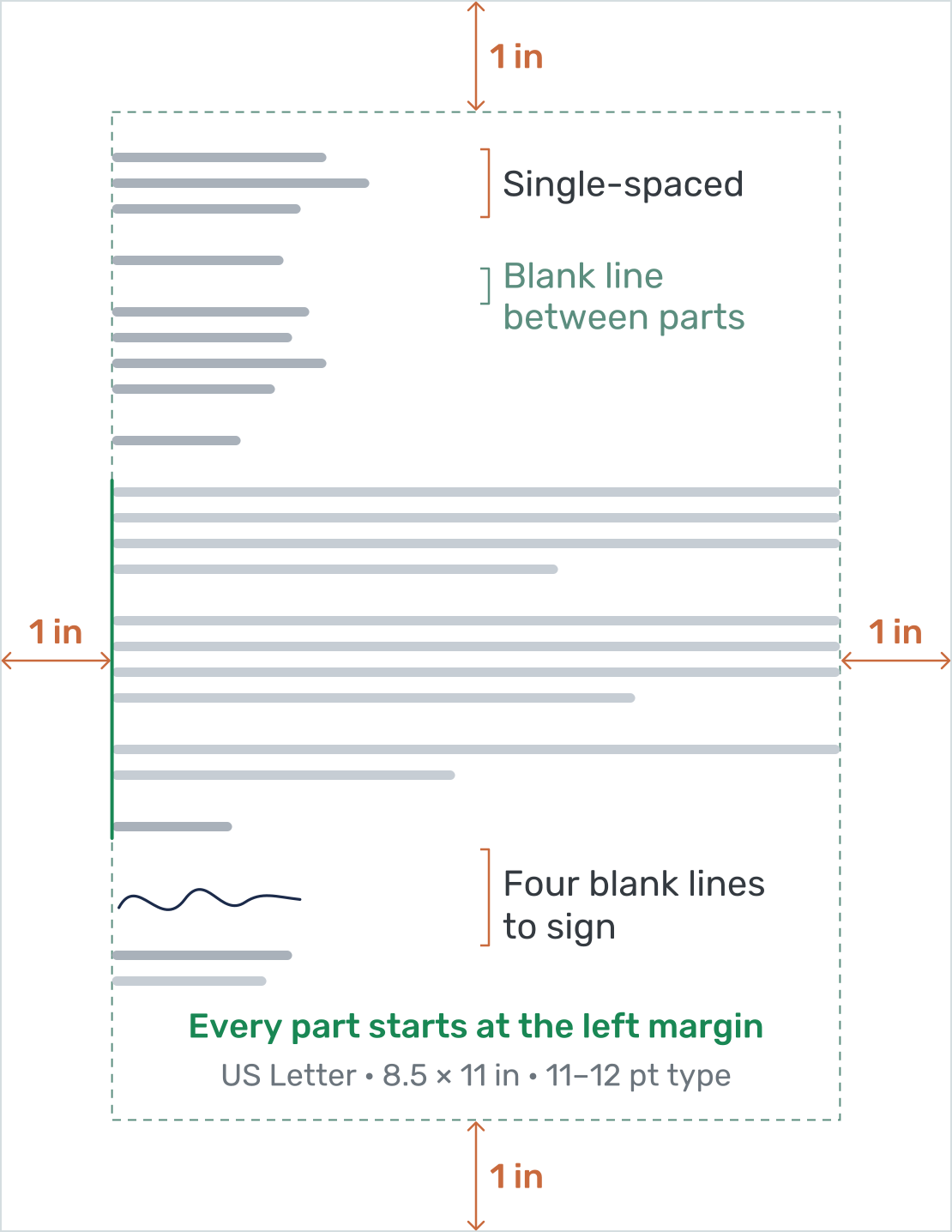
- Paper: US Letter, 8.5 × 11 inches.
- Margins: Start with one inch on all four sides.
- Type: Use a readable 11- or 12-point font. Arial, Calibri, or Times New Roman are familiar choices.
- Spacing: Single-space within paragraphs and address blocks. Leave a blank line between them.
- Alignment: In full block, align the main parts to the left and do not indent paragraphs.
- Signature: Leave four blank lines above your typed name when signing a printed letter.
These are useful US conventions, not a required layout for every recipient. Follow an organization’s own instructions when it supplies them.
Docelf uses a slightly modified block format. The date and reference sit to the right, while the recipient details and letter body start on the left. The service-appointment example on this page shows that layout.
Put the Parts in Order, With Room Between Them
For a full-block letter without letterhead, begin with your address and contact details. The date follows beneath it. Use the same left margin for the parts below.
- Sender details: Put your business name, street address, and city, state, and ZIP code on separate lines. Add a phone number or email where the reader can reach you.
- Date: Leave one blank line after the sender block. Write out the month: September 29, 2026.
- Inside address: Leave one blank line after the date, then add the recipient’s name, role if useful, company, and mailing address.
- Greeting: Leave one blank line after the address. A formal US greeting can read “Dear Morgan Lee:”.
- Body: Leave one blank line after the greeting and between paragraphs. Start with your purpose and finish with the next step.
- Closing: Leave one blank line after the last paragraph, then write “Sincerely,” or another suitable closing.
- Signature: Leave four blank lines for a handwritten signature, followed by your typed name and role.
An optional subject can sit between the greeting and body, with a blank line on either side. Some letter styles place it above the greeting. Keep the choice consistent. Put any enclosure or cc note below the signature block, and include only documents and people relevant to the letter.
Set paragraph spacing so it produces one clear gap; avoid adding both large paragraph spacing and extra blank lines. For a closer look at each field, see the parts of a business letter.
US Business Letter Format Cheat Sheet
Keep the page setup and order of parts together as you write. This one-page sheet covers US Letter paper, margins, paragraph spacing, and room for a signature.
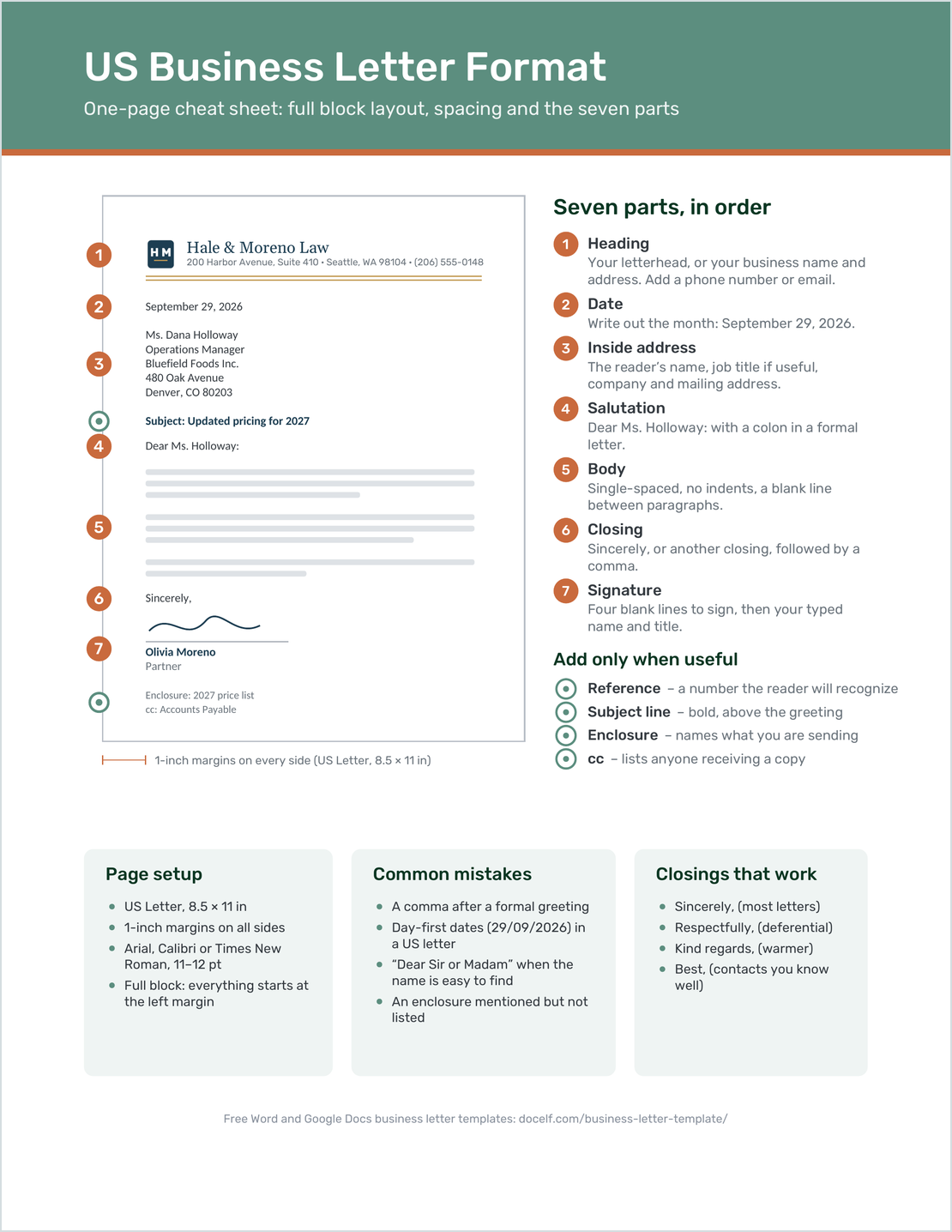
- Set US Letter paper, one-inch margins, and readable 11- or 12-point type.
- Put the sender details, date, recipient address, greeting, body, closing, and signature in order.
- Use single spacing within parts and one clear gap between them.
- Leave room to sign above your typed name.
- Add a subject, reference, enclosure note, or cc only when useful.
The sheet uses full block, with the main parts starting at the left margin. Docelf’s slightly modified block layout places the date and reference on the right.
For each part’s purpose and an example, see the seven parts of a business letter. To compare alignment, use the block-format guide.
How to Write a Business Letter in Five Steps
Decide what you want the reader to know or do before you start. Then work through the five steps marked on this Docelf service-appointment example.
- Add Your Sender Details: Use your business name, address, and contact details, or begin with your letterhead.
- Date and Address the Letter: Add the letter date and the recipient’s name, business, and address. Include a reference when useful.
- Greet the Reader: Use a named greeting where possible, such as “Dear Morgan Lee:”. A short subject can help identify the topic.
- Write the Message: Start with your purpose. Give the details the reader needs, then state the next step and any response date.
- Close and Sign: Add a courteous closing, leave signature space, and type your name and role. Check the finished letter before sharing it.
Before You Send Your Letter
- Check the recipient’s name, address, date, and any reference.
- Read the first sentence: does it explain why you are writing?
- Make the requested action and any response date easy to find.
- Check the print or PDF layout for crowded text or a signature pushed onto another page.
- Include every enclosure or attachment mentioned in the letter.
After You Send Your Letter
- For letters emailed from Docelf, check the document history to see when the letter is delivered and opened.
- If it has not been delivered, check the recipient’s email address before sending it again.
- If you need a reply, follow up after the response date you gave in the letter.
A useful follow-up gives the reader enough context to answer. Mention the original subject or reference, repeat the outstanding request, and include your contact details.
Put Your Message Into a Letter
Docelf gives your wording a ready-made letter layout. Add your details and message, then print the finished letter or download a PDF.
How to Address a Business Letter
The inside address is the recipient’s name and mailing address on the letter itself. Use the recipient’s full name, their role when it helps, the organization, and the mailing address. Keep apartment or suite details with the street address.
Inside Address Example
Morgan Lee
Riverbend Offices
480 Market Avenue
Portland, OR 97204
Follow it with “Dear Morgan Lee:”. Use a courtesy or professional title if you know the recipient uses it; you do not need to guess one.
On the Envelope
Put your return address in the upper-left corner and the recipient’s address near the center. Leave the upper-right corner for postage. Check that the name and address match the letter. Include any apartment or suite number and check the ZIP code.
When You Do Not Know the Name
Try the business website or ask who handles the matter. If you cannot find a name, put the relevant role or department above the company and mailing address. Match the greeting to it, such as “Dear Purchasing Manager:” or “Dear Customer Service Team:”. A specific role gives the letter a clearer destination than “To Whom It May Concern”.
For more openings and sign-offs, see how to start and end a business letter.
Full Block or Modified Block?
Both styles keep the message easy to read. The main difference is where the date, closing, and signature begin.
| Part | Full Block | Traditional Modified Block |
|---|---|---|
| Date | Starts at the left margin | Begins near the page center, at the same starting point as the closing |
| Recipient and body | Left-aligned | Left-aligned |
| Paragraphs | No first-line indent | No first-line indent |
| Closing and signature | Start at the left margin | Begin near the page center, aligned with each other |
Docelf uses a slightly modified block format. Its date and reference are on the right, while the recipient details and body are on the left. The example also keeps the closing and signature on the left.
Semi-block usually follows a modified-block arrangement with indented paragraphs. See the block-format guide for the layout comparison, or the formal-letter guide for more traditional wording.
With and Without Letterhead
Letterhead identifies your business before the reader reaches the message. If it already includes your business name, address, and contact details, begin the letter beneath it with the date. Leave clear space so the letterhead and date do not run together.
Without letterhead, type your address and contact details at the top. Put your personal name and role in the signature block. Keep a logo modest enough to leave room for the letter itself, and check that a home or office printer will not cut off the edges.
Browse business letterhead ideas for the header, or the template formats guide for the Word, Google Docs, and online options.
What Changes When You Send It by Email?
If you attach a PDF, keep the letter’s date, recipient details, greeting, and signature block. Give the email a useful subject, such as “Service appointment confirmation — OPS-1042”, and add a short message telling the reader what is attached.
If you write the message directly in the email body, use a subject line, greeting, short paragraphs, closing, and contact signature. You can usually leave out the postal address blocks and the separate date because the email already shows when it was sent. Keep any reference and requested response date in the message.
Attach a letter when you want the reader to save or print a document with its own date and layout. For a routine question or update, an email body may be enough.
A Complete Business Letter Example
This fictional service-appointment letter confirms the date, explains the visit, and tells the customer how to make a change. The wording below uses a written-out date and full-block reading order. Replace the names and details with your own.
Example: Service Appointment Confirmation
Oakline Property Services
1712 Alder Street
Portland, OR 97205
(503) 555-0146
hello@oakline.example
September 29, 2026
Morgan Lee
Riverbend Offices
480 Market Avenue
Portland, OR 97204
Reference: OPS-1042
Your Service Appointment Is Scheduled
Dear Morgan Lee:
I’m writing to confirm our service visit at Riverbend Offices on October 20, 2026, at 10:00 a.m. Our team will inspect the lobby entrance and review the repair options with you on site.
We’ll call the day before to confirm access. If you need to change the appointment, please call or email us and mention reference OPS-1042.
Thank you for choosing Oakline Property Services. We look forward to seeing you.
Sincerely,
[Signature]
Jordan Ellis
Client Services Manager
Use this structure to create your own business letter. The signature placeholder shows where to sign; leave the extra space when preparing a printed version.
For a different purpose, try a letter of introduction to open a business conversation or a complaint letter to explain a problem and request a remedy. Browse the business letter templates and sample letters for more situations.
Business Letter Format FAQ
-
What is the standard business letter format in the US?
A common choice is full block: left-aligned text, single spacing, and a blank line between paragraphs. Use US Letter paper, one-inch margins, and a readable 11- or 12-point font. Follow a recipient’s requested format when one is provided.
-
Is a business letter single-spaced or double-spaced?
Use single spacing within the address blocks and body paragraphs. Leave one blank line between paragraphs and major parts. For a printed letter, leave four blank lines between the closing and your typed name for a handwritten signature.
-
Where does the date go in a business letter?
In full block, put the date at the left margin below the sender details or letterhead. In a traditional modified-block layout, it begins near the page center. Docelf uses a slightly modified block format, with the date and reference on the right.
-
Do I need to include my address if I use letterhead?
If your letterhead already contains your business address and contact details, you do not need to repeat them above the date. If it only shows a logo or business name, add the missing contact details.
-
How do I address a letter when I do not know the person’s name?
Look for a named recipient first. If you cannot find one, use the relevant role or team, such as “Dear Purchasing Manager:” or “Dear Customer Service Team:”. Avoid guessing a name or title.
-
Does a business letter need a subject line?
A subject line is optional. Add a short one when it helps the reader identify the matter. Keep its position consistent with your chosen layout; a reference number can separately identify a job, order, or earlier letter.
-
Can a business letter be longer than one page?
Yes, when the reader needs the detail. Keep routine letters to one page where practical. If the letter continues, identify the recipient and date on the next page and keep the closing with enough of the message to make sense.
-
How do I send the finished letter by email?
You can email the letter from Docelf and check its delivered and opened history. You can also download a PDF and attach it to your own email, with a short message explaining the attachment. A letter written directly in the email body can use a simpler layout.
Ready to Write Your Business Letter?
Use a ready-made layout to prepare your letter for sharing.
- Add your business and recipient details
- Write the message and add your signature
- Print your letter or download a PDF




