Block Format Letter
See what moves in each letter layout
Compare full block, modified block, and semi-block letters before you choose a layout. See which parts move and how to keep your message easy to read.
Create your letter online in a slightly modified block layout, then print it or download a PDF.
14-day free trial. No credit card required.
What Is a Block Format Letter?
A block format letter arranges the message in clear sections. In full block, the date, recipient address, greeting, body, and closing all begin at the left margin. Each paragraph starts without an indent.
The main difference between the three styles is alignment. Modified block moves the date and closing across the page. Semi-block also indents the first line of each paragraph. The wording can stay the same.
Full Block, Modified Block, and Semi-Block
These diagrams show common layouts on US Letter paper. The green marks show where each body paragraph starts. The dashed orange line shows the midpoint used for the date and closing in modified block and semi-block. If your organization provides a house template, follow its spacing and alignment.
-
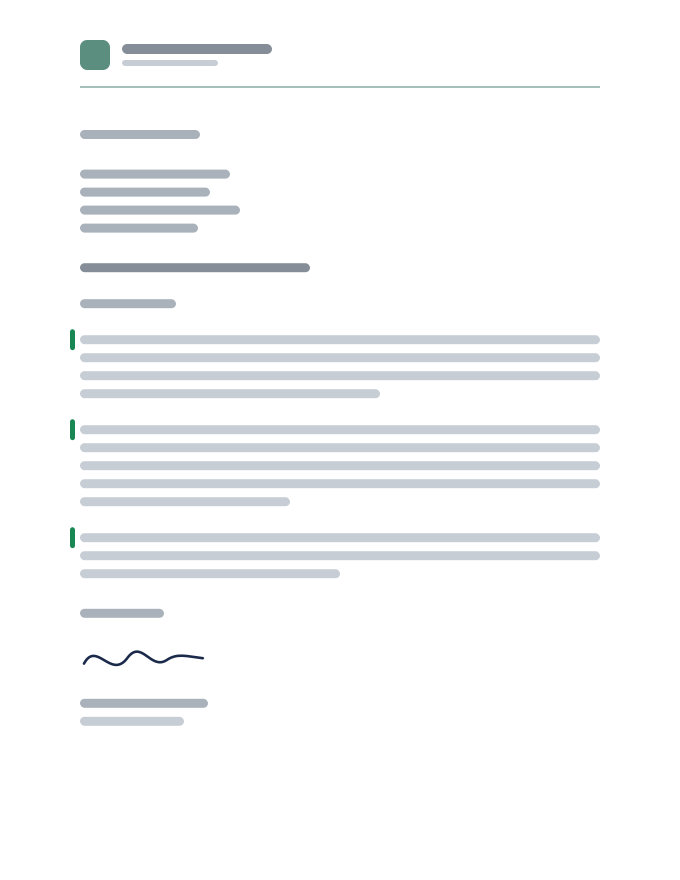
Full Block
Every main part starts on the left, including the date and closing. Paragraphs are not indented.
-
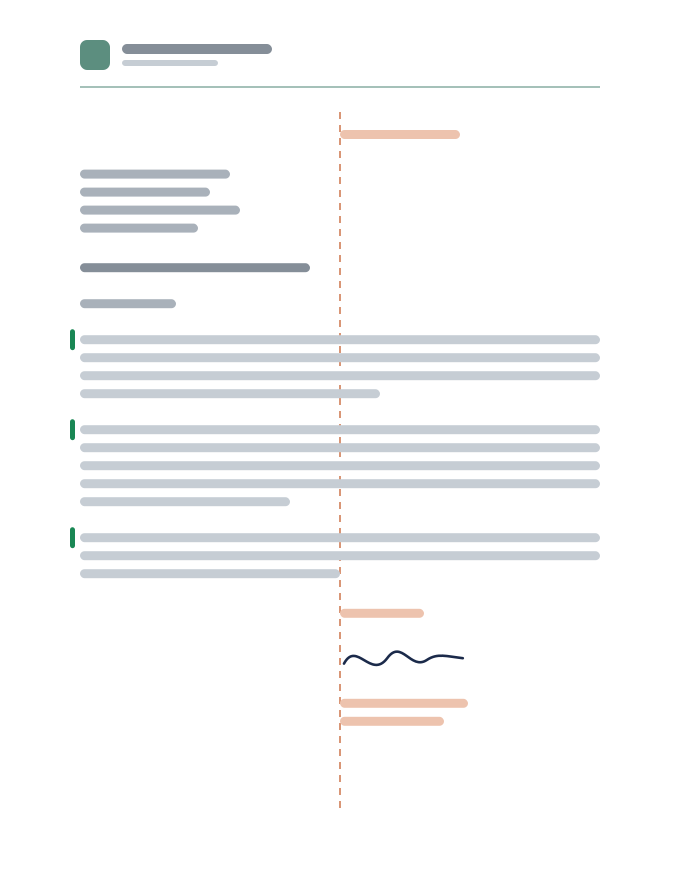
Modified Block
The date and closing begin at the midpoint; their text is not centered. The address and body stay on the left, with no paragraph indents.
-
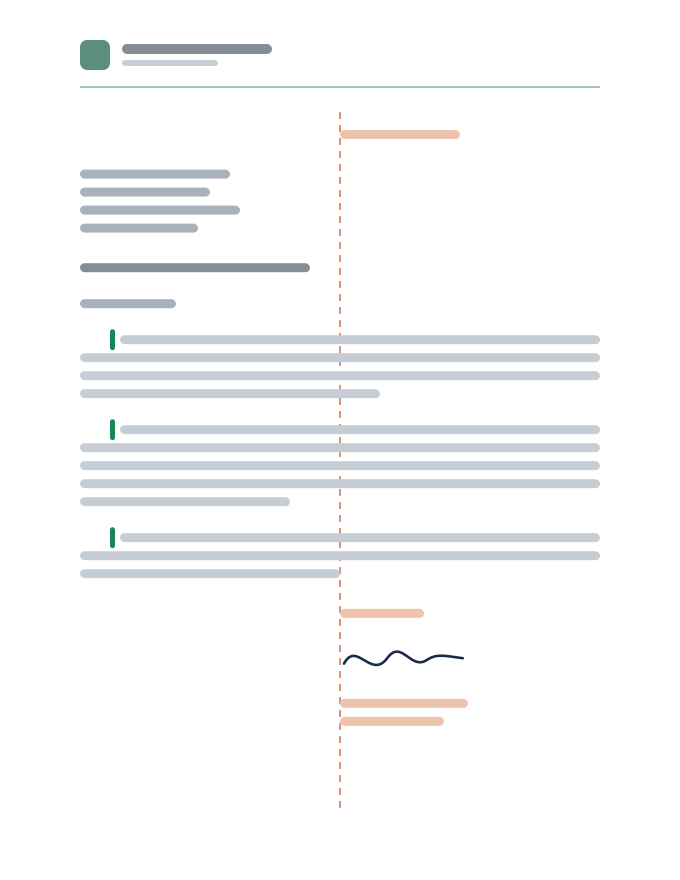
Semi-Block
The date and closing begin at the midpoint. Only the first line of each body paragraph is indented.
Which Block Style Should You Use?
Full block is a simple starting point for everyday requests, confirmations, and business updates. One left edge makes the letter easy to set up. Use it when you have no house style to follow.
Modified block suits a more traditional company layout. It separates the date and signing area from the message. Use it when it matches your existing business stationery or the recipient’s instructions.
Semi-block is useful when a supplied template calls for indented paragraphs. Set a consistent first-line indent instead of spacing each paragraph by hand. A formal message can use any of these styles; its tone comes from the wording.
For an introduction to a new customer, see the letter of introduction template. For a problem you want a business to put right, use the complaint letter template. Choose the message first, then apply the layout.
Set the Spacing Before You Write
For a letter you are laying out in Word or Google Docs, start with US Letter paper, 8.5 × 11 inches. One-inch margins and an easy-to-read 11- or 12-point font leave room for a clear message.
- Within paragraphs: Use single line spacing.
- Between paragraphs: Leave a blank line or equivalent paragraph spacing. Avoid adding both.
- First lines: Use no indent for full or modified block. A half-inch first-line indent is a common choice for semi-block.
- Date and closing: Keep their starting points consistent with your chosen style. Use a tab stop or paragraph indent to position them.
- Signature: Leave enough room to sign above your typed name and role.
Write out the month in a US date, such as September 30, 2026. Use “Dear Morgan Lee:” for a formal greeting and “Sincerely,” for the closing. The business letter format guide covers addresses and the rest of the setup.
One Letter, Different Block Layouts
The illustrated appointment letter uses Docelf’s slightly modified block layout. Below, the same message appears in full-block reading order with a written-out date. Replace the fictional names and details with your own.
Service Appointment Confirmation
Oakline Property Services
1712 Alder Street
Portland, OR 97205
(503) 555-0146
hello@oakline.example
September 29, 2026
Morgan Lee
Riverbend Offices
480 Market Avenue
Portland, OR 97204
Reference: OPS-1042
Your Service Appointment Is Scheduled
Dear Morgan Lee:
I’m writing to confirm our service visit at Riverbend Offices on October 20, 2026, at 10:00 a.m. Our team will inspect the lobby entrance and review the repair options with you on site.
We’ll call the day before to confirm access. If you need to change the appointment, please call or email us and mention reference OPS-1042.
Thank you for choosing Oakline Property Services. We look forward to seeing you.
Sincerely,
[Signature]
Jordan Ellis
Client Services Manager
For full block, keep each part aligned left and leave room to sign. To use traditional modified block in your own document, move the date and whole closing block to the same midpoint tab stop. For semi-block, also indent the first line of each body paragraph. The wording stays the same.
How Docelf’s Letter Layout Differs
Docelf uses a slightly modified block format. The date and reference sit to the right, while the recipient details and body start on the left. In the appointment example, the closing and signature also begin on the left.
The generator uses this ready-made layout. The full block, modified block, and semi-block diagrams explain general letter styles; they are not three layout options in the editor.
Write a Letter in Docelf’s Layout
The appointment letter shows where your details go. Follow the numbers from your business information to the signature, and write the message that fits your own task.
- Add Your Business: Enter your business name, address, and contact details so the reader knows who is writing.
- Set the Date and Reference: Check the date at the right. Add a reference when it helps the reader identify the letter.
- Add the Recipient: Enter the recipient’s name, business, and address in the left-hand block.
- Write Your Message: Add a suitable greeting and a short subject if useful. Explain your purpose, then say what happens next.
- Finish with Your Signature: Add a closing and your name. Check the preview, then print the letter or download a PDF.
Before You Send Your Letter
- Check the recipient’s name and address, the date, and any reference.
- Check the paragraph indents and closing position against the layout you are using.
- Replace every placeholder and check any requested response date.
- Check page breaks so the closing and signature stay with at least a few lines of the message.
After You Send Your Letter
For letters emailed from Docelf, check the document history to see when the letter is delivered and opened. If it has not been delivered, check the email address before sending it again.
If you asked for a reply and have not heard back, follow up after the response date. An opened letter does not tell you whether the reader has agreed to your request.
A useful follow-up names the original letter and repeats the next step. In the appointment example, the business promises to call the day before the visit. Keep that promise and confirm the access arrangements.
Put Your Message into a Ready-Made Layout
Use Docelf’s slightly modified block layout for your letter. Add your details and wording, then check the preview. Print it or download a PDF when it is ready.
Working in Word or Google Docs?
Start with your organization’s template or a letterhead design from the Word and Google Docs pages below. Then adjust the letter text to match the block style you need.
- Full block: Align the letter text to the left and use no paragraph indents.
- Modified block: Give the date and the whole closing and signature block the same midpoint indent. Keep the text within those blocks left-aligned.
- Semi-block: Use the modified-block settings, then add a half-inch first-line indent to each body paragraph.
Check the final page after changing the alignment. The US format cheat sheet keeps the page setup, spacing, and order of parts together.
Common Block-Format Mistakes
Mixing layouts halfway through the letter. If you use traditional modified block, line up the date and closing at the same starting point. If you use an established company template, keep its arrangement throughout.
Using spaces to move text. Alignment can shift when you change the font or wording. Set a tab stop or paragraph indent in your document instead.
Squeezing the letter onto one page. Shorten repeated wording before reducing the font or margins. If the letter needs a second page, keep the closing and signature with at least a few lines of the message.
Adding labels the reader does not need. A subject or reference can help identify a request, but neither is required for every letter. Add an enclosure note only when you are including something.
Block Format Letter FAQ
-
What is a block format letter?
A full block letter places its main parts at the left margin. Body paragraphs are single-spaced, separated by a blank line, and have no first-line indent. Modified block and semi-block change some of those positions.
-
What is the difference between full block and modified block?
In full block, the date and closing start at the left margin with the rest of the letter. In a common modified block layout, they start at the midpoint. The recipient address and body paragraphs stay left-aligned.
-
Is semi-block the same as modified block?
Semi-block uses the same date and closing placement as modified block, but indents the first line of each body paragraph. Use it when a company template or an assignment asks for that style.
-
Do I indent paragraphs in a block letter?
Use no first-line indent in full block or modified block. In semi-block, use a consistent first-line indent, commonly half an inch. Set the indent in the document’s paragraph settings rather than adding spaces.
-
Is a block letter single-spaced or double-spaced?
Single-space within each body paragraph and leave a blank line between paragraphs. Leave clear gaps between the address, greeting, body, and closing, plus space above your typed name for a signature.
-
Which block format does Docelf use?
Docelf uses a slightly modified block format. The date and reference sit to the right, while the recipient details and body start on the left. The illustrated closing also starts on the left. The three general layout diagrams on this page are not editor layout choices.
-
Can I print my letter or download a PDF?
Yes. You can create your letter in Docelf, check the finished layout, then print it or download a PDF. This uses Docelf’s slightly modified block layout; it is not a Word or Google Docs export.
Ready to Write Your Letter?
Use Docelf’s slightly modified block layout to prepare your letter for sharing.
- Add your business and recipient details
- Write your message and requested next step
- Review, print, or download a PDF




