Free Offer Letter Template
Create a professional offer letter in minutes
Put your job offer in writing with the role, pay, and start date. Give the candidate clear terms to review and a simple way to reply.
Print your offer letter or download it as a PDF.
14-day free trial. No credit card required.
Hourly Job Offer Letter Example
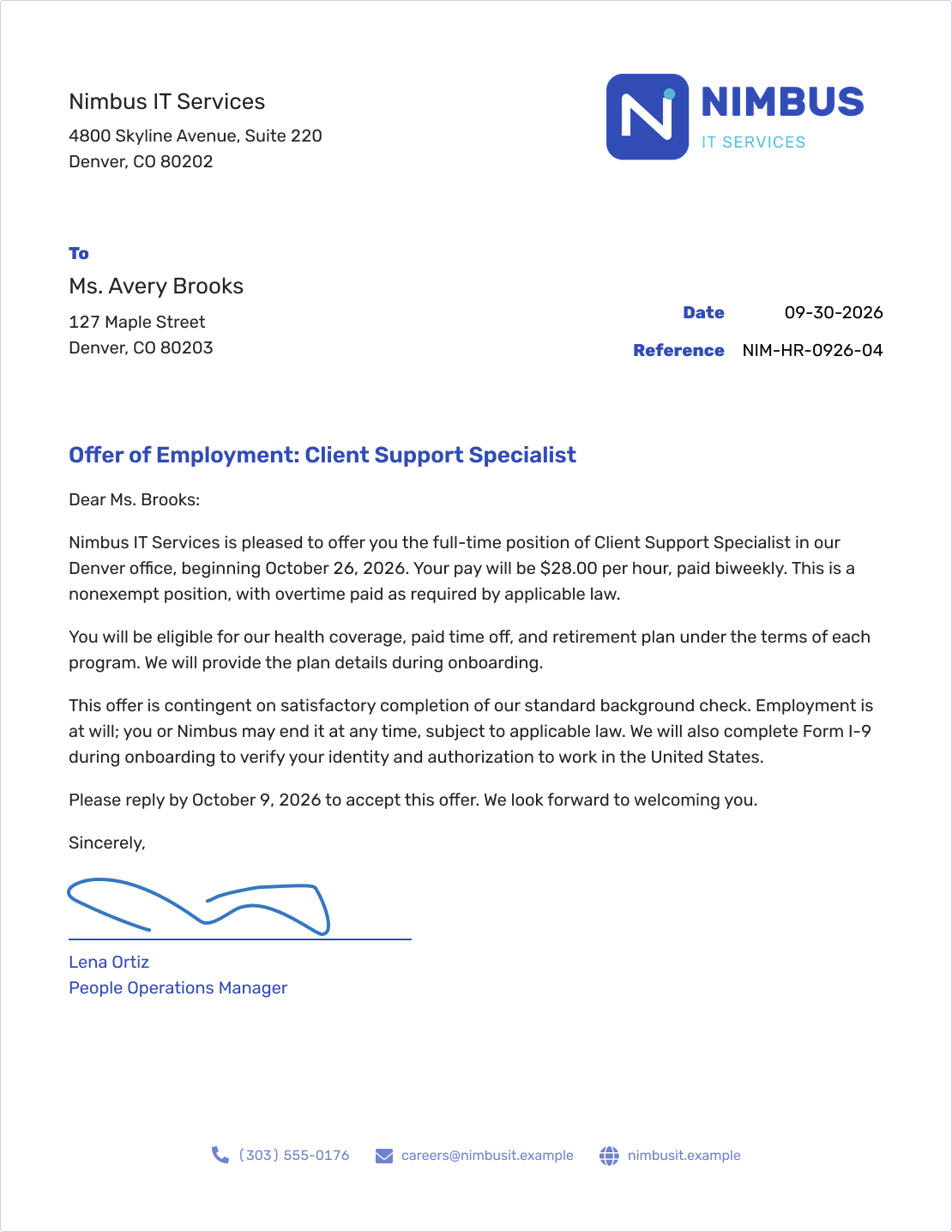
This hourly job offer shows the role, pay basis, and start date in a clear letter layout. The wording below also covers salaried roles and hiring conditions.
What Is an Offer Letter?
An offer letter is a written job offer from an employer to a candidate. It sets out the role, pay, start date, and how to reply so the candidate can decide whether to accept.
Send it once you have approved the hiring terms. If a condition still needs to be met, explain it clearly rather than leaving the candidate to guess. For a price offered to a customer, use a quote template instead.
Review any employment agreement or other hiring paperwork separately. This template is a writing guide, not legal advice; have an HR or legal reviewer check wording that affects employment terms.
Offer Letter Wording You Can Adapt
Replace each [placeholder] with the agreed details, and write dates as Month Day, Year. Choose hourly or annual pay and remove optional lines that do not apply. Use only conditions and employment-status wording your HR or legal reviewer has approved.
Sample Job Offer Letter
[Business name]
[Business street address]
[City, State ZIP]
[Business phone and email]
[Letter date]
Reference: [Hiring reference]
[Candidate name]
[Candidate street address]
[City, State ZIP]
Offer of Employment: [Job title]
Dear [Candidate name]:
We are pleased to offer you the [Full-time or part-time] position of [Job title] with [Business name]. Your proposed start date is [Proposed start date]. You will report to [Manager name and title] and work at [Work location or remote arrangement]. Your expected schedule is [Weekly hours and work schedule].
Your pay will be [Pay amount] per [Hour or year], paid [Pay frequency]. [HR-reviewed overtime and pay-classification wording.]
You will be eligible for [Benefits summary] under [Eligibility rules and plan terms]. You can find the details in [Benefits document or contact].
This offer is subject to [Applicable, HR-reviewed conditions]. [HR-reviewed employment-status wording, if applicable.]
Please confirm your acceptance by [Reply deadline] using [Reply method and contact details]. If you have questions about the offer, contact [Contact name] at [Email or phone number].
After you accept, we will confirm your first-day arrangements and provide instructions for employment eligibility verification and other onboarding steps. We look forward to welcoming you to the team.
Sincerely,
[Sender signature]
[Sender name]
[Sender job title]
[Business name]
If you request signed acceptance, add a clearly labeled acceptance line with the candidate's name, signature, and date, and explain how to return it. An opened email is not an acceptance.
What to Include in a Job Offer Letter
The candidate should be able to find the important terms without searching through several emails. Check the letter against the hiring details you have approved.
- Employer and candidate: Use the correct business name, candidate name, and contact details.
- Role and work arrangement: Give the job title, manager, location, and expected schedule.
- Pay: State the amount, whether it is hourly or annual, and the pay frequency.
- Start date: Write out the date and identify any steps still needed before the person starts.
- Benefits: Summarize the benefits that apply and explain where to find eligibility and plan details.
- Conditions and employment terms: State any remaining hiring steps and the employment terms that apply.
- Reply instructions: Give a deadline, a way to accept, and a contact for questions.
Keep a subject or hiring reference when it helps identify the offer. If you mention a benefits summary or another enclosure, include it when you send the letter.
How to Write an Offer Letter in Docelf
Have the agreed hiring details ready before you start. Follow the numbers to add them to the letter layout.
- Your Business: Enter your business name and contact details.
- Your Logo: Add your business logo if you have one.
- Candidate: Enter the candidate's name and mailing address.
- Date and Reference: Set the letter date and add a hiring reference if useful.
- Offer Details: Add a greeting, role, pay basis, start date, and any applicable conditions.
- Closing and Reply: Give a reply deadline and method, then add your closing and signature.
Before You Send Your Offer
Read the letter from the candidate's point of view. They should know what you are offering and exactly how to respond.
- The role, pay basis, schedule, and start date match the approved offer.
- Benefits match the relevant plan details and eligibility rules.
- Any conditions and employment-status clauses have been reviewed.
- The reply deadline leaves time before the proposed start date.
- The candidate's name and email are correct, and any mentioned documents are included.
- Every placeholder has been replaced or removed.
After You Send Your Offer
- Check the document history in Docelf to see when your emailed letter is delivered and opened.
- If you have not received a response, follow up after the reply date in the letter.
- Once the candidate accepts, confirm the agreed terms and the remaining onboarding steps.
Keep the follow-up brief: mention the role, ask whether the candidate has any questions, and give them a way to reply. Check their response before treating the offer as accepted.
Put Your Offer in Writing
Add your agreed hiring terms. Docelf keeps the letter layout in place while you write. Review the offer, then print it or download a PDF.
Adjust the Wording to the Hiring Situation
The same layout can hold different offers. Change the terms to match the actual arrangement rather than keeping wording from a previous hire.
An Hourly Role
The illustrated Nimbus IT Services offer is for a Client Support Specialist at $28 per hour, paid biweekly, with a proposed start date of October 26, 2026. It asks Avery Brooks to reply by October 9, 2026. For your offer, also describe the expected weekly hours and schedule.
A Salaried Role
Give the annual salary and pay frequency, such as “Your salary will be [Annual salary] per year, paid [Pay frequency].” Spell out the frequency, such as every two weeks or twice a month. Describe any bonus or commission separately from regular pay.
Paying a salary does not automatically mean an employee is exempt from overtime pay. Have your reviewer check the role’s pay classification; see the U.S. Department of Labor's salary-basis guidance.
An Offer with Conditions
Name each applicable condition and explain what the candidate needs to do next. If the start date depends on completing a check, say when you will confirm it. If your process includes a background check, the offer letter does not replace the separate notices and permissions that may be required. Use the EEOC and FTC background-check guidance when reviewing that process.
Keep employment eligibility verification in your onboarding instructions. Follow USCIS Form I-9 guidance for the form and its timing.
A New Arrangement or Revised Offer
For part-time, remote, or seasonal work, describe the hours, location, and expected work period. A promotion needs the new role and effective date. If you revise an earlier offer, identify its date and clearly state the agreed changes; have any fixed-term or employment-status wording reviewed.
Format Your Offer So It Is Easy to Read
Use US Letter paper, readable 11- or 12-point type, and a written-out date such as September 30, 2026. Keep the body left-aligned with a blank line between paragraphs, a suitable greeting and closing, and space for your signature.
Docelf uses a slightly modified block format. The date and reference sit to the right, while the recipient details and body start on the left. The business letter format guide explains the general spacing and layout.
Small Changes That Make an Offer Clearer
Read the pay and reply paragraphs together. The candidate should know what you are offering and how to accept.
- Replace a bare pay figure: Write “per hour” or “per year” and add the pay frequency.
- Explain benefit eligibility: State when benefits begin and any eligibility rules, or point to the plan details.
- Make the response specific: Replace “Let us know soon” with a reply date and contact.
- Remove unrelated clauses: Check conditions and employment terms instead of copying them from another hire.
- Identify revised offers: Refer to the earlier offer by date and show which terms have changed.
Use the Wording in Word, Google Docs, or an Online Letter
Use the copy icon above to copy the sample wording into a Word or Google Docs template from the pages below. If you prefer to write online, use Docelf, then print the finished letter or download a PDF.
Compare the business letter formats, or use the letterhead guide when setting up a document yourself.
Offer Letter FAQs
-
What should a job offer letter include?
Include the job title, work arrangement, pay amount and basis, pay frequency, start date, relevant benefits, and any reviewed conditions. Finish with a reply deadline, acceptance instructions, and a contact for questions.
-
Can I use this template for hourly and salaried roles?
Yes. For an hourly role, give the hourly rate and expected work schedule. For a salaried role, give the annual salary and pay frequency. Have the pay classification and overtime wording reviewed for the position.
-
How do I write a conditional offer?
State the conditions your HR or legal reviewer has approved and explain what the candidate needs to do for each. Complete any required hiring forms, notices, and permissions separately; the offer letter does not replace them.
-
Should I include an at-will statement?
Include employment-status wording only when it fits the arrangement and your HR or legal reviewer has approved it. Do not copy an at-will clause into every offer or use a template to decide its legal effect.
-
Does opening an emailed offer mean it has been accepted?
No. Opening shows that the letter was viewed. Ask the candidate to reply or return a signed acceptance, according to the instructions in your letter, and check that response before confirming the next steps.
-
Can I use the wording in Word or Google Docs?
Yes. Copy the sample wording into one of the Word or Google Docs letter templates and replace the placeholders. You can also write the letter in Docelf, then download it as a PDF or print it.
-
Can I email an offer letter from Docelf?
Yes. Email your letter directly from Docelf and check its document history for delivered and opened information. If you have not received a response, follow up after the reply date stated in the offer.
Ready to Send Your Job Offer?
Give the candidate one letter they can review and respond to. Start with the agreed terms and make the next step clear.
- Add your business and candidate details
- Write the offer and explain how to reply
- Print the letter or download a PDF




