Free Termination Letter Template
Create a professional letter in minutes
Write an employee termination notice or a letter ending a vendor agreement. State the end date and practical next steps so the recipient knows what to do.
Print your letter or download it as a PDF.
14-day free trial. No credit card required.
Vendor Termination Letter Example
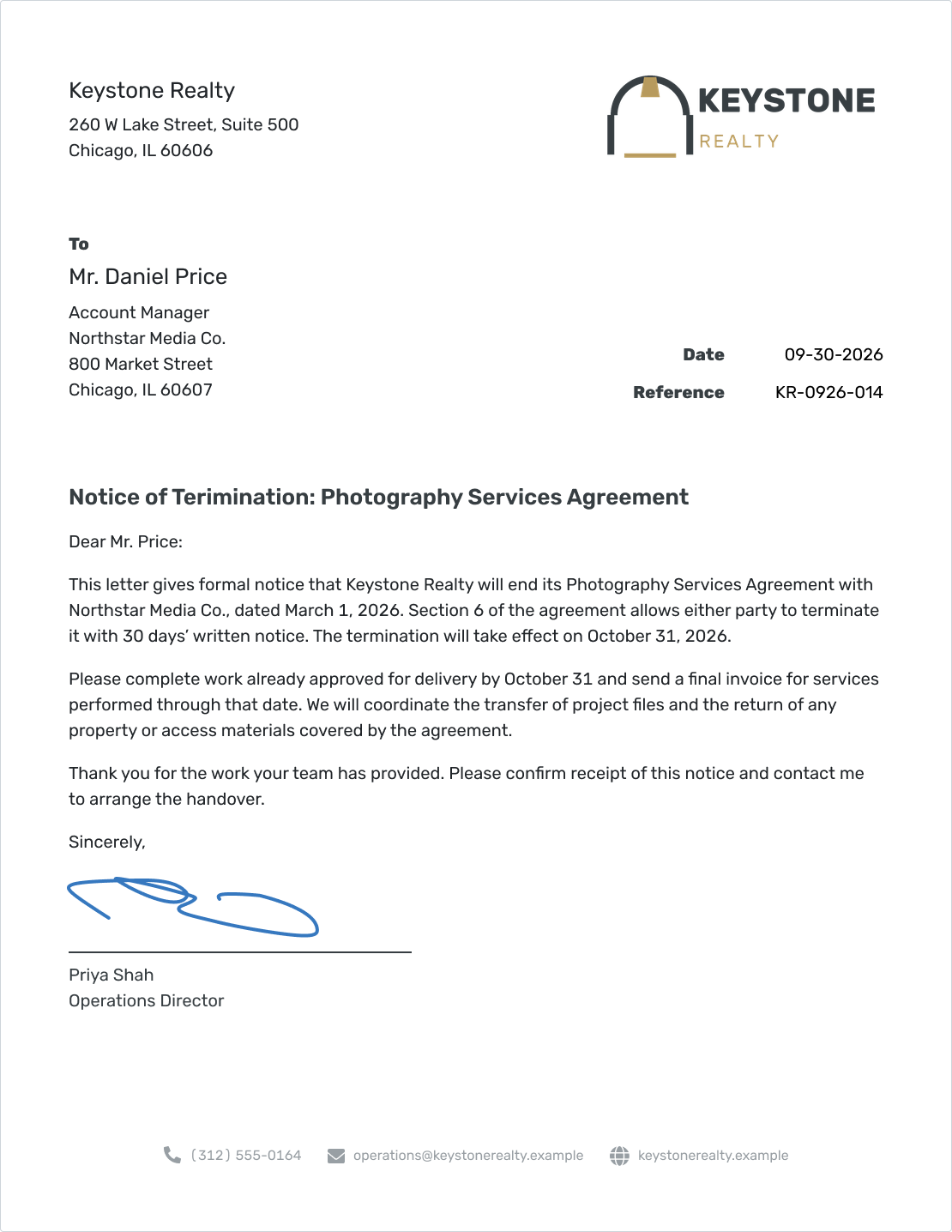
Keystone Realty ends its photography services agreement with Northstar Media Co. This preview shows the vendor version; separate employee and contract wording appears below.
What Is a Termination Letter?
A termination letter puts the end of employment or a business agreement in writing. It identifies the relationship, states the effective end date, and explains what happens next.
An employee letter confirms the employment end date, final pay, benefits, and any handover. A vendor letter identifies the agreement, the termination clause, and when services will end.
These templates provide general drafting guidance and are not legal advice.
For a contract reaching its scheduled expiration, check whether you need a nonrenewal notice instead. If you want to fix a service problem before deciding to end the agreement, a complaint letter may be the better starting point.
Employee Termination Letter Wording
Keep the decision clear and the next steps considerate. Replace every [placeholder] with verified information, and have the wording reviewed for the employee’s situation before sending.
Check the final-pay deadline and benefits arrangements before entering them in the letter. The U.S. Department of Labor explains that some states require immediate final payment even though federal law does not.
Employee Termination Template
[Business Name]
[Business Address]
[City, State ZIP]
[Month Day, Year]
Reference: [Employee or Case Reference, if useful]
[Employee Full Name]
[Employee Address]
[City, State ZIP]
Subject: Notice of Employment Termination
Dear [Employee Name]:
This letter confirms that your employment with [Business Name] ends on [Termination Date] at [Time]. Your last working day is [Last Working Date].
[Reviewed Explanation of the Decision, if included]
Your final pay will be provided on [Verified Payment Date] by [Payment Method]. It will include [Verified Wages and Any Other Amounts Due]. Please contact [Payroll Contact and Contact Details] with questions about your final pay.
[Benefit or Coverage] will end on [Verified Date]. [Benefits Contact and Contact Details] will provide information about [Applicable Benefits Arrangements]. Any required benefits notices will be provided separately.
Please arrange the return of [Company Property] with [Contact] by [Date], using [Return Method]. For [Any Work Handover], please follow [Confirmed Instructions].
If you have questions about these arrangements, contact [HR or Business Contact] at [Email or Phone].
Sincerely,
[Signature]
[Sender Full Name]
[Job Title]
[Business Name]
Remove optional reference, benefits, or handover lines that do not apply. Include the explanation paragraph only when it is appropriate and reviewed. Keep payment arrangements separate from property return.
Contract or Vendor Termination Letter Wording
Start with the agreement itself. Check the termination clause, how notice must be delivered, and how the effective date is calculated before filling in this version.
Contract Termination Template
[Business Name]
[Business Address]
[City, State ZIP]
[Month Day, Year]
Reference: [Agreement Reference]
[Recipient Full Name]
[Job Title]
[Vendor Business Name]
[Vendor Address]
[City, State ZIP]
Subject: Notice of Termination of [Agreement Name]
Dear [Recipient Name]:
[Business Name] gives notice that it will terminate the [Agreement Name] with [Vendor Business Name], dated [Agreement Date]. Under [Exact Section or Clause], [Accurate Summary of the Termination Right and Notice Requirement]. The termination will take effect on [Verified Effective Date].
Please [Confirmed Instructions for Work During the Notice Period]. Submit any final invoice for [Services or Work Covered] to [Billing Contact] by [Agreed Submission Date]. Payment will follow [Applicable Agreement Terms].
We will coordinate [Project File or Work Handover] with [Contact] by [Date]. Please arrange the return of [Property or Access Materials Covered by the Agreement] using [Agreed Return Method].
Please confirm receipt of this notice by [Response Date] and contact [Name] at [Email or Phone] to arrange the handover.
Sincerely,
[Signature]
[Sender Full Name]
[Job Title]
[Business Name]
Asking the recipient to confirm receipt helps you keep a record of the notice. It does not ask them to agree to new terms. Leave out final-invoice or property lines when the agreement does not call for them.
What to Include in a Termination Letter
Make it easy for the recipient to find the end date and the person who can answer questions. The remaining details depend on whether you are ending employment or an agreement.
- The business, recipient, and relationship being ended.
- The letter date and the effective end date, clearly distinguished.
- Any explanation approved for the employment decision, or the relevant contract clause for a vendor.
- Verified final-pay and benefits information, or final work and billing arrangements.
- Property return, handover instructions, and a named contact.
Docelf uses a slightly modified block format. The date and reference sit to the right, while the recipient and body start on the left.
For US letters, use US Letter paper, readable type, a written-out date, clear paragraph spacing, and room for a signature. The business letter format guide explains the general layout.
How to Write a Termination Letter in Docelf
Have the employment details or agreement beside you as you write. The numbered vendor example shows where each part goes; use the employee wording above for an employment notice.
- Your Business: Add the business name, address, and contact details.
- Recipient: Address the employee or the vendor contact named in the agreement.
- Date and Reference: Use the letter date and a useful employment or agreement reference.
- Decision and End Date: State what ends and when. For a contract, identify the relevant clause.
- Next Steps: Give the verified pay or billing arrangements, handover tasks, and contact.
- Closing and Signature: Add the sender’s name and role. Review the letter before printing or downloading a PDF.
Before You Send Your Termination Letter
Check the letter against the employment records or agreement. Confirm the dates and promised arrangements, including how the notice must be delivered.
- The decision and wording have been reviewed by the appropriate person.
- The recipient, agreement or employment details, and end date are correct.
- Any notice period and delivery method have been checked.
- Pay, benefits, billing, and handover details are confirmed.
- The letter includes the contact details and any documents it mentions.
After You Send Your Termination Letter
- Check the document history in Docelf to see when your emailed letter is delivered and opened.
- Keep the notice and any delivery evidence required by the agreement or applicable rules.
- If you requested a reply, follow up after that response date to confirm the handover arrangements.
Keep the follow-up focused on an unfinished task, such as arranging a file transfer or property return. Delivery and opening history help you follow the message; they do not establish that the notice meets every contractual or legal requirement.
Create Your Termination Letter
Docelf gives your notice a clear business letter layout. Add your wording, review the finished letter, then print it or download a PDF.
Choose the Version That Fits the Decision
Ending Employment After a Reviewed Decision
Confirm the effective date and final arrangements once the decision has been approved. If the employee is leaving because a role is being eliminated, use the reviewed explanation for that situation rather than performance wording.
Giving Notice Under a Service Agreement
Use the contract version when the agreement allows termination on notice. Identify the clause and confirm whether the notice period starts when the letter is sent, received, or otherwise takes effect under that agreement.
Ending a Project With Work Still in Progress
Say which approved work should be completed and what needs to be handed over. Check the agreement before changing the scope or asking the vendor to stop work; the notice should reflect the arrangements that actually apply.
Addressing an Alleged Contract Breach
Review the required process before using a standard termination notice. A contract may call for notice of the problem and an opportunity to fix it first. Have the clause and proposed wording checked when the right to terminate is disputed.
Mistakes to Avoid
A short letter can still leave important questions unanswered. Use the wording to make the decision and practical arrangements easy to follow.
- Mixing up dates: The letter date, last working or service day, and effective termination date can differ. Label them clearly.
- Copying a notice period: The 30-day period in the photography example comes from that fictional agreement. Check your own clause.
- Adding unreviewed accusations: Keep reasons factual and consistent with the records. Leave personal criticism out.
- Linking wages to property return: Keep final-pay obligations separate and have the arrangements checked.
- Treating an email view as legal proof: Check the required delivery method rather than relying only on opened history.
Get appropriate HR or legal review when the decision raises discrimination or retaliation concerns. The EEOC’s retaliation guidance explains the protection for employees who assert their rights under EEO laws.
Termination Letter Resources and Formats
Use the copy icons above to copy the employee or vendor wording into an editable template. Choose a Word or Google Docs template from the pages below, or write your letter online and print it or download a PDF.
Related Letters and Writing Guides
An offer letter sets out a proposed job and starting terms. A termination letter addresses the end of employment and the arrangements that follow. For a new service relationship, an engagement letter sets out the scope and responsibilities.
For other business messages, browse the business letter template hub.
Termination Letter FAQs
-
Can I use the same termination letter for an employee and a vendor?
Use the version that matches the relationship. An employee letter covers employment, final pay, benefits, and company property. A vendor letter identifies the agreement, notice clause, final work, billing, and handover.
-
Should an employee termination letter include a reason?
Use the explanation approved for the particular decision. Keep it factual and consistent with the records. Have HR or legal counsel check whether a reason or additional notice is required before sending; do not copy a reason from an unrelated sample.
-
How much notice should a contract termination letter give?
Check the actual agreement and the requirements that apply to it. The notice period, delivery method, and point when notice takes effect can change the end date. The photography example uses its own 30-day clause; that is not a rule for other contracts.
-
When should an employee receive final pay?
Confirm the deadline under the applicable state rules and any other requirements before entering a date. Federal law does not require immediate final payment, but some states do. Use the verified payment date and method in the letter.
-
Can I email a termination letter?
Check any required notice method first. If email is suitable, you can email the letter from Docelf and view delivered and opened history. That history alone does not show that you have met the contract’s notice rules or any legal requirements for delivering the notice.
-
Does acknowledging receipt mean accepting the termination?
Keep receipt and agreement separate. If you request acknowledgment, say that it confirms receipt of the notice. Handle any proposed settlement, release, or change to contract terms in a separate document with appropriate review.
-
Is termination the same as not renewing a contract?
Early termination ends an agreement before its scheduled end. Nonrenewal lets it end at the agreed expiration date. Check the relevant clause and any notice deadline, then use wording that describes the action you are taking.
-
Can I print or download the termination letter as a PDF?
Yes. Write and review the letter in Docelf, then print it or download a PDF. You can also use a Word or Google Docs letter template and adapt the wording on this page.
Write a Clear Termination Notice
Give the recipient a notice they can read and act on.
- Use the wording for the relationship you are ending
- Add the verified end date and practical next steps
- Review, print, or download your letter as a PDF




