ATV Bill of Sale Template

Download a free template for your off-road sale.

Choose a free template for your ATV, UTV, golf cart or snowmobile. Record the vehicle, price and payment so the seller and buyer know what changed hands.

Edit in Word or Google Docs, use the fillable PDF, or print a blank copy.

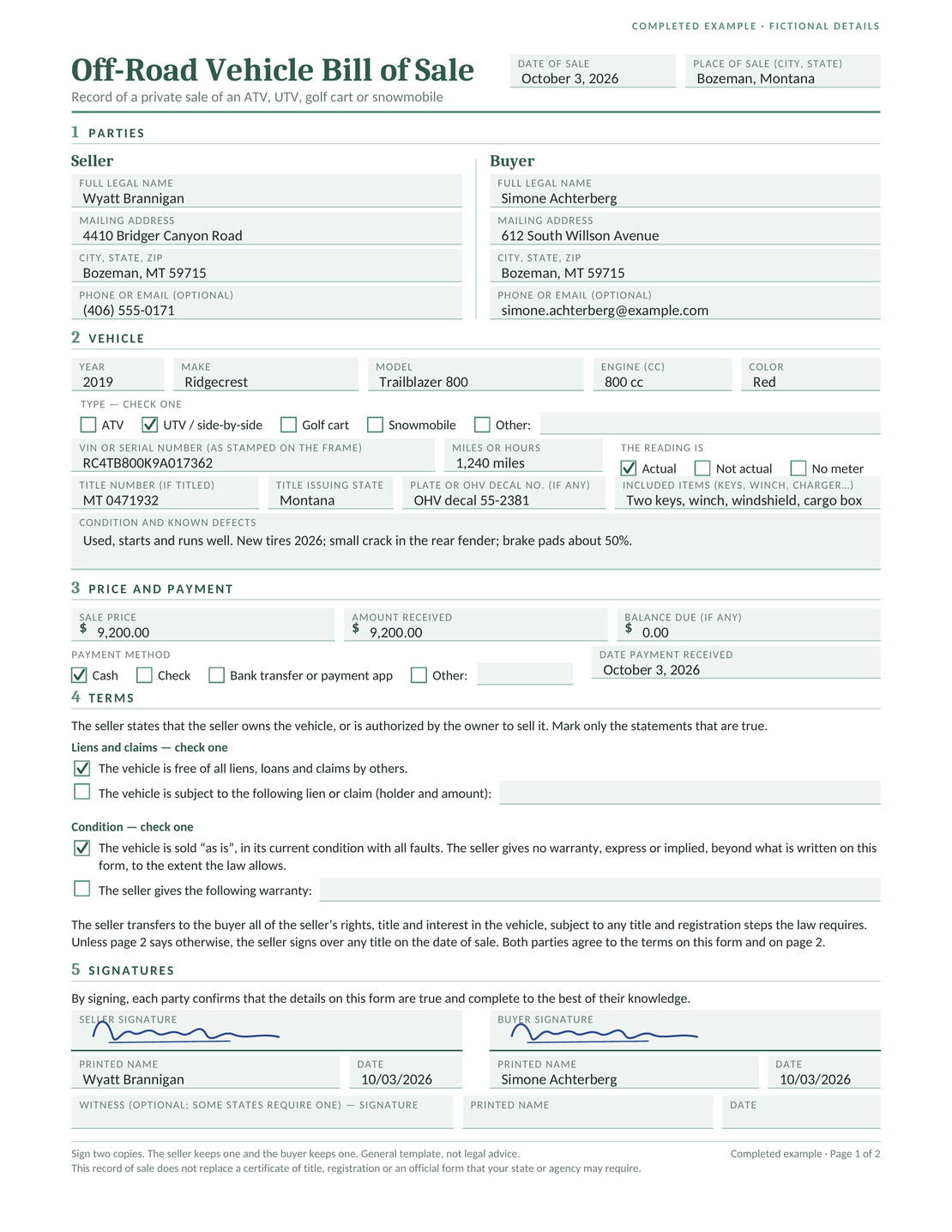
Completed fictional bill of sale for a 2019 Ridgecrest Trailblazer 800 UTV sold for $9,200.

Document the sale and agreed terms. Give both seller and buyer a signed copy.

Download a Free ATV Bill of Sale Template

Choose a Word or Google Docs template to edit, a fillable PDF to type into, or a blank PDF to print. For Google Docs, sign in and choose Make a copy to save your own version.

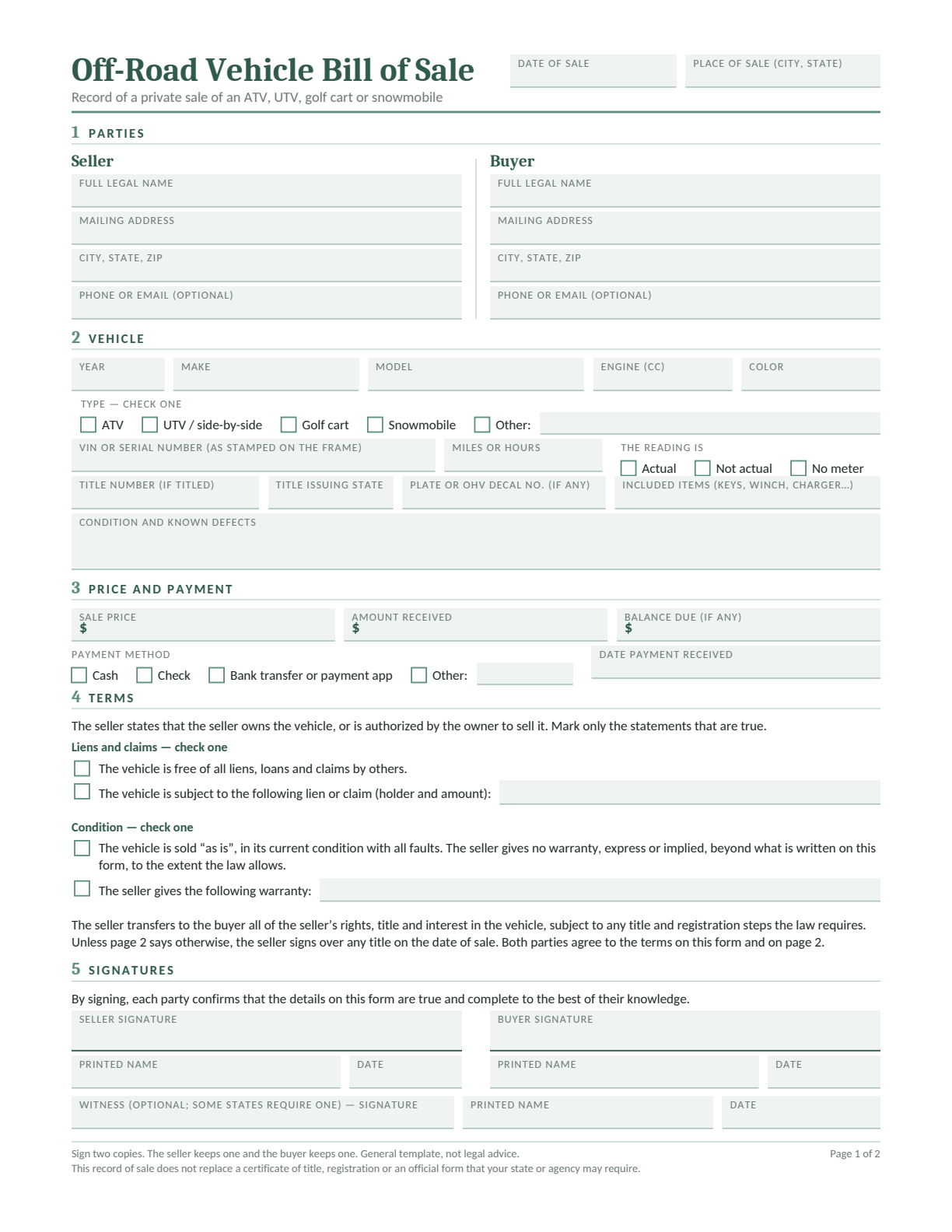
First page of the blank off-road vehicle bill of sale.

Off-Road Vehicle Bill of Sale

One template for an ATV, UTV or side-by-side, golf cart, or snowmobile. Choose the vehicle type on the form.

The template has space for the VIN or serial number, miles or hours, included equipment, condition and payment. Use the second page for extra terms, such as collection arrangements or a promised repair.
About This Template

These are general templates, not legal advice. Follow the official forms and transfer instructions for your sale. See our Terms and Conditions.

What Is an ATV Bill of Sale?

An ATV bill of sale records who sold the vehicle, who bought it and what they agreed. It connects the price and payment to a particular machine, including its identifying number and condition.

Keep it with any title, registration or trail permit documents. The bill of sale records the deal; the official transfer process depends on the vehicle and state.

Which Off-Road Vehicle Are You Selling?

Use the same template for each type below, and add the details that identify your vehicle. A familiar name such as “golf cart” does not decide its legal classification.

ATV or Quad

Record the VIN or manufacturer’s serial number, make, model, year and engine size. Add the displayed miles or hours, and describe tire, brake or body damage.

UTV or Side-by-Side

Include the model and seating, then list extras such as a cab, winch, windshield or cargo box. State whether each extra is included in the price.

Golf Cart

Record its serial number or VIN and whether it is gas or electric. Describe the batteries and list the charger if included. Check separately whether it is classified as a low-speed vehicle.

Snowmobile

Include the make, model, year and identifying number. Record any mileage shown, engine details and known track or body damage.

Selling a trailer with the vehicle? Identify the trailer separately and use the trailer bill of sale template for its sale details and paperwork.

What to Include in Your ATV Bill of Sale

DetailWhat to Record
Seller and buyerFull legal names, addresses and a way to contact each other.
Date and locationThe date of sale and the city and state where it takes place.
VehicleType, year, make, model, color and VIN or manufacturer’s serial number. Keep any engine number separate.
Reading and recordsLabel the reading as miles or hours. Add the title number and issuing state, and any plate or OHV decal number.
Equipment and conditionList included keys, accessories and equipment, then describe known defects and any agreed repairs.
Price and paymentAgreed sale price, amount actually received, payment method and date, and any balance still due.
Terms and signaturesMark only the ownership, lien and condition statements that are true. Add any other agreed terms, then sign and date.

An unknown meter reading is not zero. If the vehicle has no meter, use the “No meter” option. If it shows hours, write “hours” with the number so it cannot be mistaken for mileage.

Where to Find the VIN or Serial Number

Check the vehicle itself, then compare the full number with the ownership records. Use the owner’s manual for your make, model and year: the location can change even within one brand.

Keep the vehicle’s VIN or serial number separate from the engine number. If the number is missing, unreadable or different from the paperwork, ask the manufacturer or the office handling the transfer to help resolve it.

How to Fill In Your ATV Bill of Sale

Have the vehicle and its ownership records nearby. The numbered illustration follows the five sections of the off-road template.

Off-road bill of sale with numbered markers for parties, vehicle, payment, terms and signatures.
  1. Name the seller and buyer: Enter both parties’ legal names and addresses. Add the sale date and location at the top.
  2. Describe the vehicle: Choose its type and copy the identifying number from the machine. Add miles or hours, ownership-record details, included equipment and known defects.
  3. Record the payment: Separate the sale price from the amount received. Show any balance and record the payment method and date.
  4. Check the terms: Mark only the lien and condition statements that are true. Use page two for extra terms, such as a repair promise, collection arrangements or a balance due date.
  5. Sign and keep copies: Follow any official witness or notary instructions. The seller and buyer should each keep the complete signed document.

See a Completed UTV Bill of Sale

In this fictional example, Wyatt Brannigan sells a red 2019 Ridgecrest Trailblazer 800 UTV to Simone Achterberg in Bozeman, Montana, on October 3, 2026.

DetailFictional Example
Vehicle and readingVIN RC4TB800K9A017362; 800 cc; 1,240 actual miles.
Title and decalMontana title MT0471932; OHV decal 55-2381.
Included itemsTwo keys, winch, windshield and cargo box.
ConditionStarts and runs well. New tires in 2026; small crack in the rear fender; brake pads about 50%.
Payment$9,200 sale price; $9,200 received in cash on October 3, 2026; $0 balance.
Terms and collectionLien-free and as-is statements selected. The buyer trailers the UTV away and the seller signs over the title on the sale date.
Completed fictional UTV bill of sale: Wyatt Brannigan sells a 2019 Ridgecrest Trailblazer 800 to Simone Achterberg for $9,200 in cash.

Download the Completed Example (PDF)

Bill of sale document preview with the Docelf elf illustration.

Document Your Off-Road Vehicle Sale

Choose the format you prefer, add the vehicle and payment details, and review the terms together.

Download an ATV Bill of Sale

Check the Ownership Paperwork

Ask the office handling the vehicle what evidence of ownership and transfer forms it needs. If a required title is missing, resolve that process before relying on a bill of sale alone.

Rules differ even between similar vehicles. Wisconsin DNR explains which machines qualify as ATVs or UTVs; golf carts do not fit its ATV definition. California DMV lists separate ownership and registration documents for off-highway vehicles.

For a snowmobile previously registered in New York and bought in a private sale, New York DMV calls for the bill of sale and the seller’s signed registration. Check the instructions for your own state and vehicle.

Check the Vehicle Before You Sign

A bill of sale does not authorize road or trail use. For example, North Port’s golf cart guidance separates conventional golf carts from low-speed vehicles, and Florida’s low-speed vehicle law has its own title, registration and insurance requirements.

Keep the Sale and Transfer Records

Keep the complete signed bill of sale with proof of payment, any lien release and the title or registration papers. Record later payments if a balance remains.

Complete the buyer’s registration or title steps and the seller’s reporting duties where required. Check trail permits, insurance and permitted use before riding.

Official Forms and Instructions

Start with the agency for your vehicle and state. These sources explain their own requirements:

ATV Bill of Sale Questions

Choose Your ATV Bill of Sale Template

Bill of sale document preview with the Docelf elf illustration.

Use the off-road template to record the details of your sale.

  • Identify the vehicle and included equipment.
  • Record its condition, price and payment.
  • Review the terms and keep a signed copy.
Download an ATV Bill of Sale

Free Templates from Docelf

Create free business documents like invoices, estimates, quotes and receipts from these blank, printable and downloadable templates

Try Docelf Free for 14 Days

Docelf

Create and send unlimited documents. Every feature is included.

Create and send unlimited documents.

Every feature is included.

Start Free Trial

No credit card required.

After 14 days, continue for $12.99/month only if you choose to upgrade.